
Triples
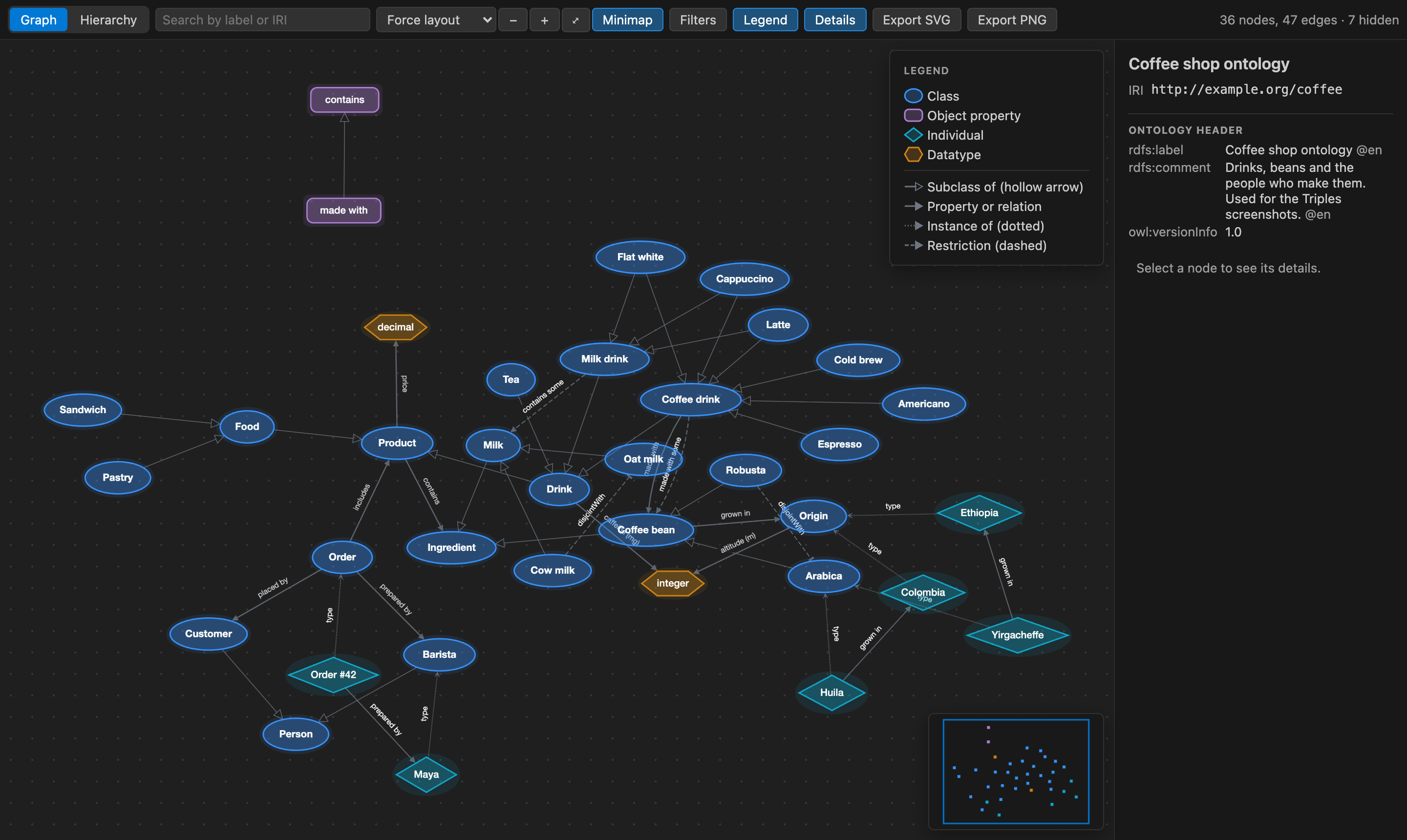
See your ontology. Triples turns Turtle, OWL and other RDF files into a clear, interactive graph inside VS Code, and shows what changed between two versions.
Screenshots
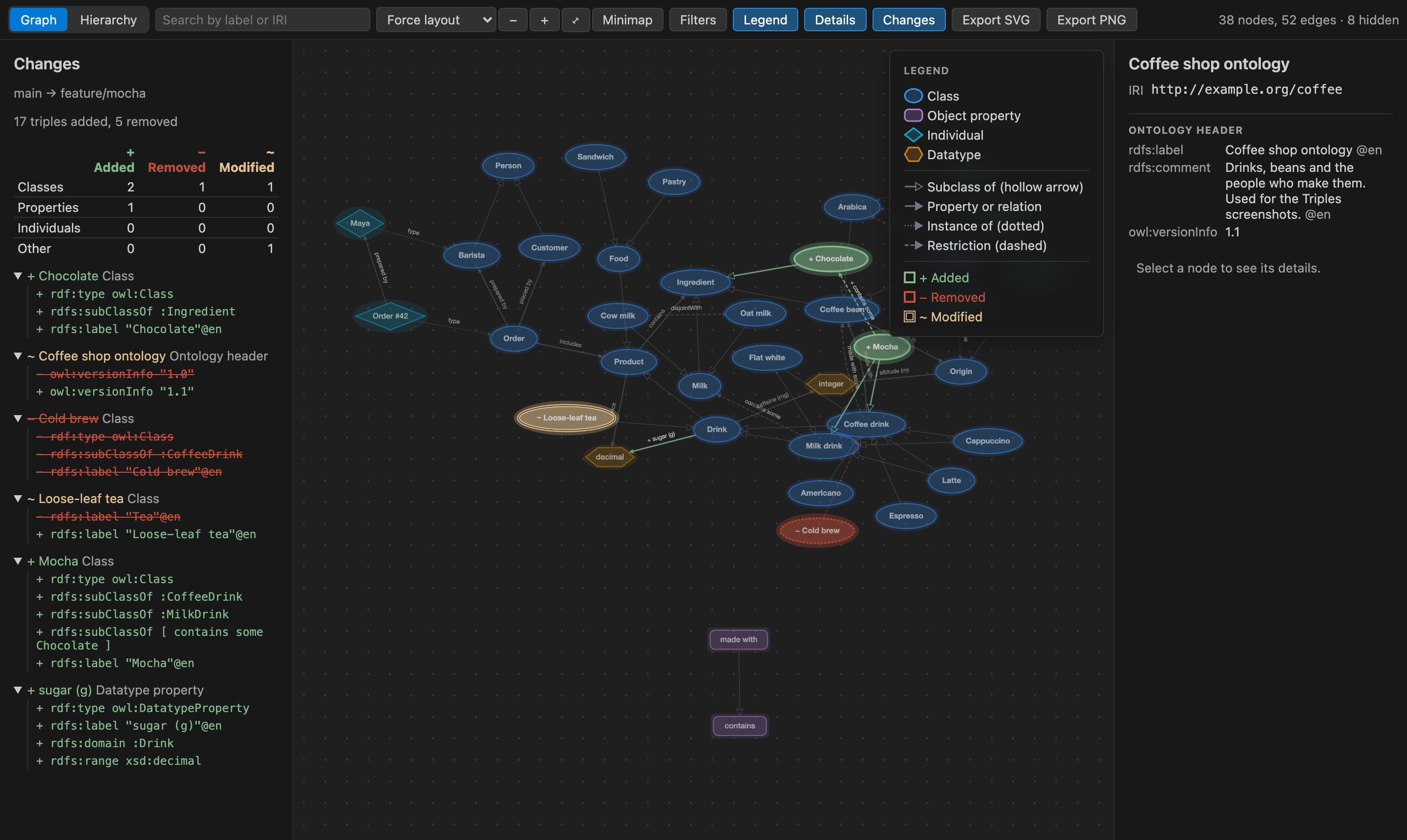
Semantic diff. Compare a branch with main: added classes are green, removed are red and dashed, modified are amber. The summary panel counts changes and links to each one.
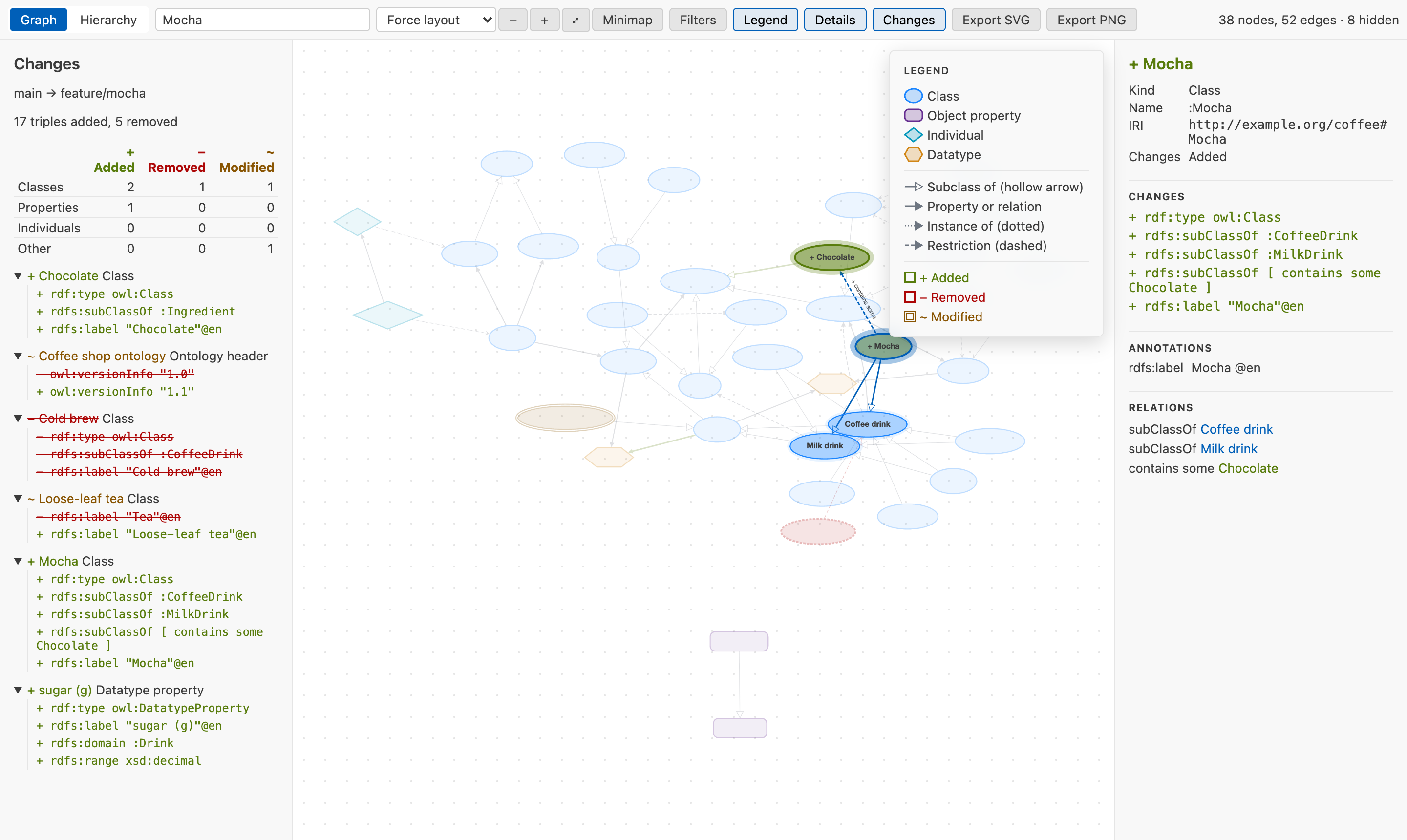
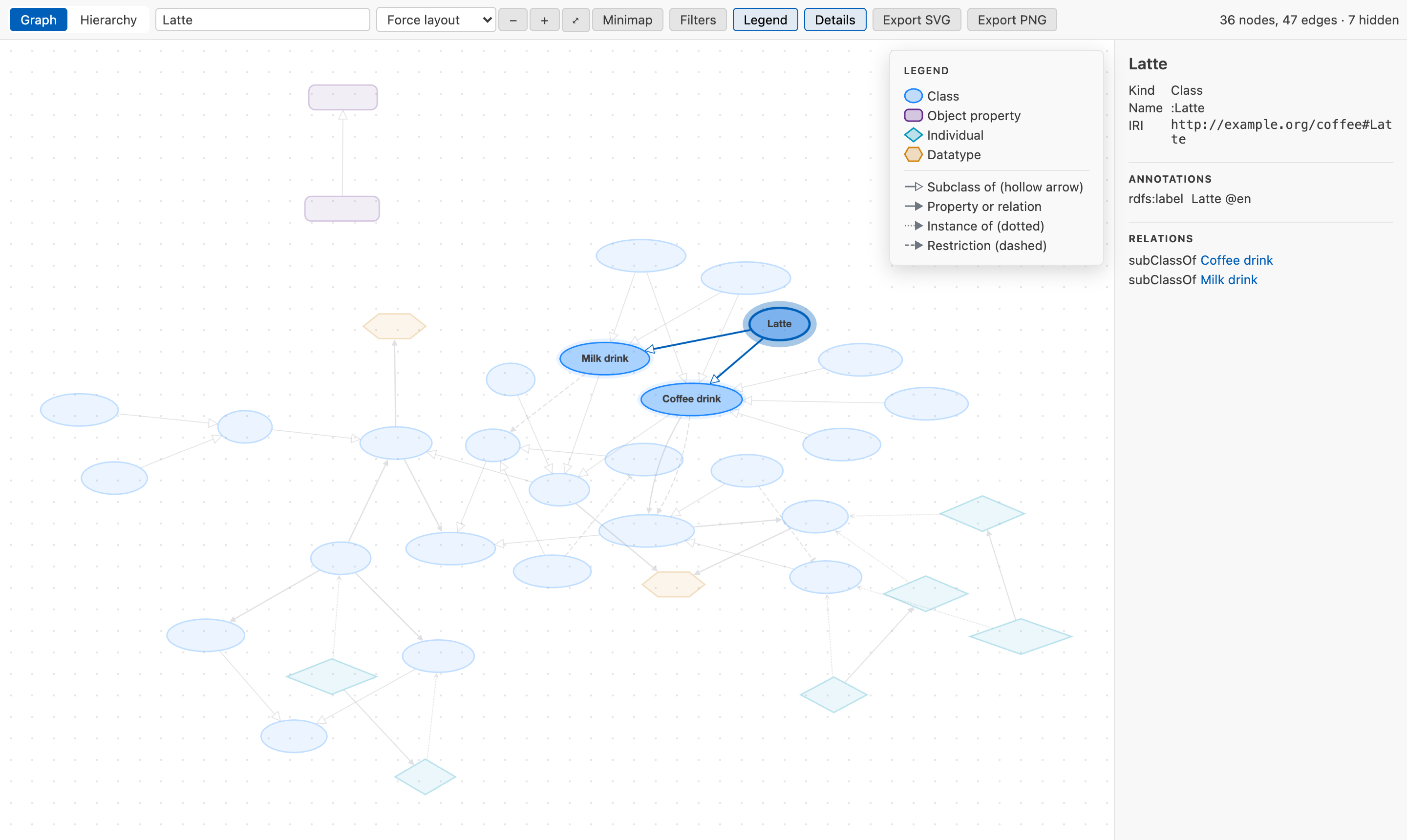
Focus on a node. Select a node to highlight its neighbors and read its IRI, annotations, changes and relations in the details panel.
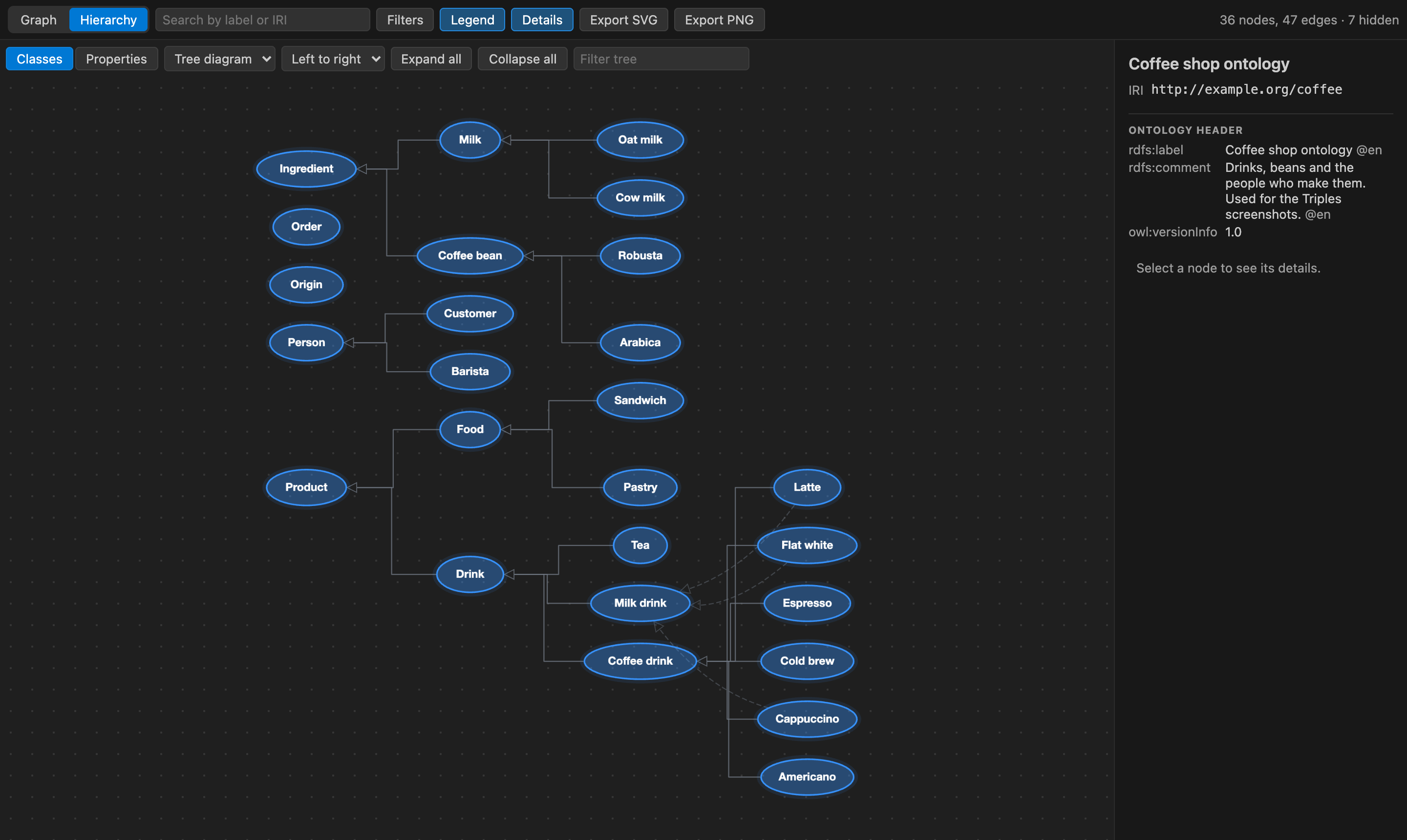
Hierarchy as a tree diagram. Classes laid out by rdfs:subClassOf, left to right. Classes sit under their first parent; links to other parents are dashed, so the tree stays readable.
Light theme. Colors follow your VS Code theme, including high contrast.
The example files are in examples/.
Features
- Graph view: classes, properties and individuals as nodes with labeled arrows. Zoom, pan, fit to screen, force or layered layout, and an optional minimap that shows the whole graph and moves the view when clicked or dragged.
- Hierarchy view: class and property trees by
rdfs:subClassOfandrdfs:subPropertyOf, as an outline or a tree diagram. Multiple parents are marked. Selection stays in sync with the graph view. - Readable by default: labels from
rdfs:labelin your VS Code language, collapsed prefixes (foaf:Person), the compact name next to labels that several nodes share (Person (foaf:Person)), distinct shapes and colors per kind, and a legend. Blank nodes are named after the values they hold, such asdateTime gteq launchDate, instead of "anonymous".owl:Thing, annotation links, data values and "instance of" links to classes with more than 15 instances are hidden until you turn them on. - SHACL shapes: node shapes are drawn as shapes, and their target classes as classes. A simple property shape becomes one arrow from the shape to its class or datatype, labeled with its path and counts, such as
name [1..1]. A property shape with more constraints stays a node named after its path, with the constraints in the details panel. - Large graphs stay readable: with more than 300 edges, edge labels show only around the selected node. When you zoom out, the busiest nodes keep a readable label, so the overview still shows what is where. Above 100 individuals, each class is drawn once with a count, such as
Constraint ×47, and links between individuals become one link per relation with a count. Double-click a class to open its individuals, and again to close them. - Details panel: full IRI, annotations, data values and relations of the selected node.
- Search and focus: find any node by label or IRI. Double-click a node to focus on its neighborhood.
- Filters: by node kind, namespace and relation type.
- Semantic diff: compare two versions of an ontology. Added nodes are green, removed are red and dashed, modified are amber. Reordering, whitespace, prefix changes and syntax changes (Turtle to RDF/XML) are ignored, because Triples compares the data, not the text. Unchanged OWL restrictions stay unchanged, even when their blank nodes get new labels.
- Keyboard: in the graph, arrow keys move to the connected node in that direction, Enter selects the node in the middle or focuses on the selected one, Escape clears the selection,
+,-and0zoom and fit. With nothing selected, arrow keys pan. Screen readers announce the selected node's label, kind and change status. - Export: the current view as SVG or PNG.
- Live: the view refreshes while you edit, and keeps zoom, pan and selection, also after a window reload.
- Large files: above 20,000 nodes the graph waits for you. Search for a node to see its neighborhood, filter, open the hierarchy, or draw everything anyway.
- Clear errors: parse errors show the line and a "Go to line" link.
- Private and offline: no network access, no telemetry. JSON-LD remote contexts are refused, not fetched.
Supported formats
| Format | Extensions |
|---|---|
| Turtle, N3 | .ttl, .n3 |
| RDF/XML (OWL) | .owl, .rdf |
| JSON-LD | .jsonld |
| N-Triples, N-Quads, TriG | .nt, .nq, .trig |
| OWL Functional Syntax | .ofn |
| OWL/XML | .owx |
| Manchester Syntax | .omn |
.owl files in Turtle, Functional Syntax, OWL/XML or Manchester Syntax are detected and work too.
Usage
- Open an ontology file.
- Click the Triples button in the editor title bar, or right-click the file in the Explorer, or run Open with Triples by Radost IT from the Command Palette. The visualizer opens beside the text.
- Use the toolbar to switch between Graph and Hierarchy, search, filter, change the layout and export. Triples remembers the view per file.
To see several files as one graph, for example an ontology and the data that uses it, select them in the Explorer, right-click and choose Open with Triples by Radost IT. An IRI used in more than one file is drawn once.
You can also right-click a file and choose Open With... > Triples Visualizer.
Comparing versions
- Triples: Compare Ontology with HEAD shows the uncommitted changes of the current file.
- Triples: Compare Ontology with Branch, Tag or Commit... lets you pick any Git revision. It is also in the Explorer right-click menu.
- Triples: Compare Two Ontologies compares two files. Select two files in the Explorer, or pick them in a dialog.
- Triples: View Ontology Changes is in the Source Control view on a changed file, and in the title bar of any diff editor. In the Source Control view it matches Git: under Changes it compares the staged file with the working copy, and under Staged Changes (View Staged Ontology Changes) it compares HEAD with the staged file. This includes pull request diffs from the GitHub Pull Requests extension, so you can review the PR base against the head. In that extension's file tree, right-click a changed ontology and choose View Ontology Changes.
The changes panel lists added, removed and modified classes, properties and individuals, each with its added and removed statements underneath. Click a name to jump to the node, or the arrow to fold its statements. In the filters, Show only changes hides everything else except a ring of unchanged neighbors in the graph, and the path to each changed class or property in the hierarchy.
A new or deleted file shows everything as added or removed. A renamed IRI shows as removed plus added.
Development
Requires Node.js 22 or newer.
npm install
npm run build        # bundle extension and webview into dist/
npm run watch        # rebuild on change
npm run lint         # ESLint and type check
npm run format:check # Prettier
npm test             # unit tests (Vitest)
npm run test:vscode  # integration tests in a downloaded VS Code
Press F5 in VS Code to start the Extension Development Host.
GitHub Actions runs lint, the format check, unit tests, integration tests and packaging on Linux, Windows and macOS for every push to main and every pull request that changes more than documentation. The Linux job uploads the .vsix as a build artifact.
To refresh the README screenshots, build first, then run the script. It opens the webview in headless Chrome with VS Code theme colors and renders the files in examples/ to docs/images/. Set CHROME if Chrome is not in the default location.
npm run build
npm run screenshots
To add a language, create l10n/bundle.l10n.<locale>.json (for example bundle.l10n.de.json) that maps each English message in src/extension/strings.ts and src/webview/strings.ts to its translation, keeping placeholders such as {0}. Command titles go in package.nls.<locale>.json. Messages without a translation stay in English.
Source layout:
src/core: parsing, model, diff and view logic. No VS Code or DOM APIs.src/extension: commands, panels, custom editor and Git integration.src/webview: the UI, plus the Web Worker that parses files.test/fixtures: sample ontologies and before/after pairs for diff tests.
Design notes are in docs/decisions.md and dependency licenses in docs/dependencies.md.
Packaging
npm install
npm run package
This runs a production build and writes triples-<version>.vsix. Install it with:
code --install-extension triples-<version>.vsix
Run npx vsce ls to see which files go into the package.
Contributing
Bug reports, ideas and pull requests are welcome.
- Report a bug: open an issue with the VS Code version, the Triples version, and a small ontology file that shows the problem. Remove anything private from the file first.
- Suggest a feature: open an issue that describes what you want to see and why. Check docs/roadmap.md first, it may already be planned.
- Send a pull request:
- Fork the repository and create a branch from
main. - Set up the project as described in Development.
- Keep the change small and focused. Add or update tests for every behavior change, especially in
src/core. - Diff engine changes need before/after fixture pairs in
test/fixtures/diff/. - Run
npm run lint,npm run format:check,npm testandnpm run test:vscodebefore you push. - Update
README.mdandCHANGELOG.mdif users will notice the change. - Use Conventional Commits for commit messages, for example
fix(graph): keep selection after refresh.
- Fork the repository and create a branch from
- New dependencies: check the license and bundle size first and record both in docs/dependencies.md. The extension must stay offline, so no network access.
AGENTS.md has the full project conventions. By contributing you agree that your work is released under the MIT license.
License
About
Built by Radost IT.