
It really whips the llama's ass — on Unix. (UnAmp, as in Unix.)
Website: unamp.divanv.com
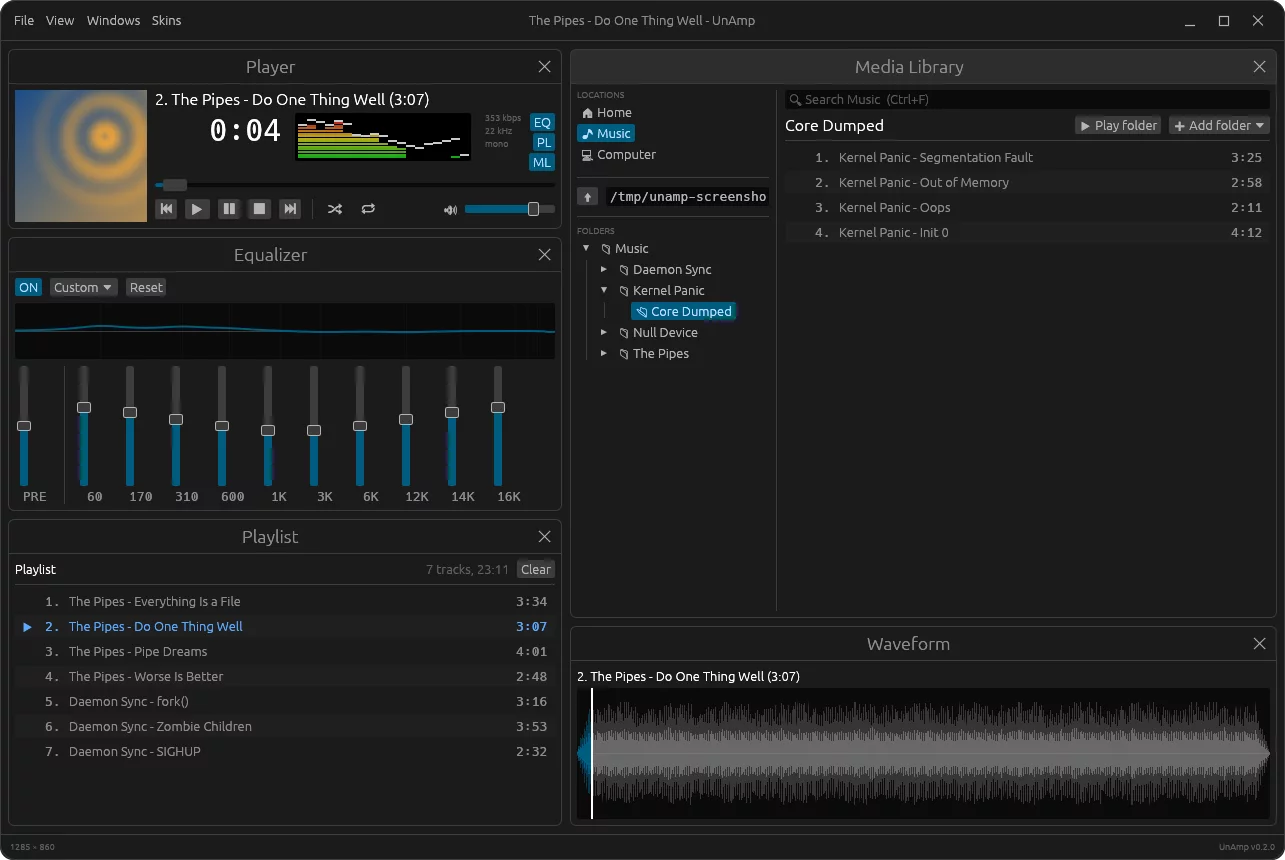
Native Rust/egui music player. Point it at a folder, a mounted drive or a network share and play what's there: album art, a scrolling title, a big time display, a proper bar spectrum analyzer and a 10-band equalizer. Like the original, it comes in separate windows — Player, Equalizer, Playlist and Media Library — that you can open, close and arrange.
Screenshot
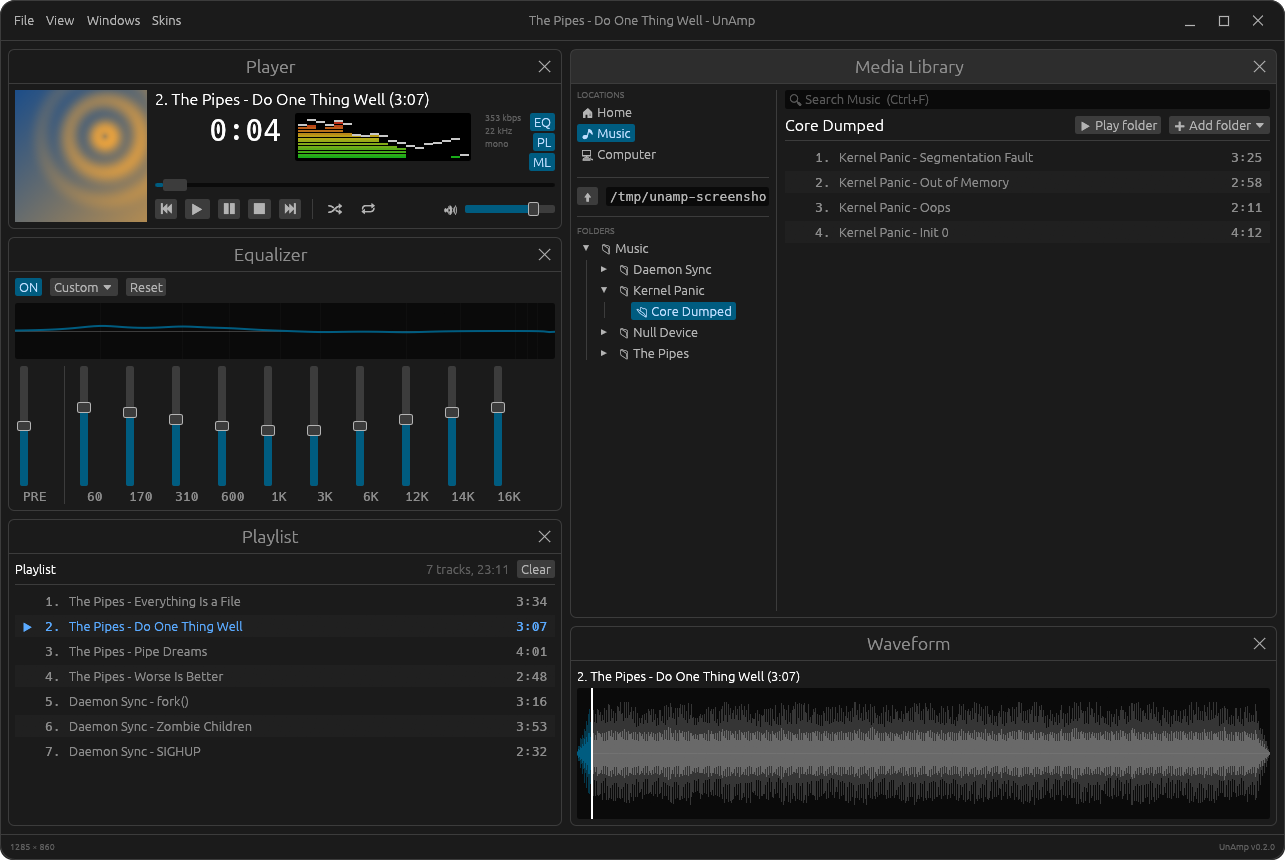
The library in the picture is fake: make screenshot builds a temporary folder of synthesised
songs, runs UnAmp against it, and saves the result to docs/screenshot.png, so it can be
regenerated after any UI change without showing anyone's real music or drives
(ADR-0021).
Status
New (v0.1). Built and used on Linux (ADR-0001); each
release also ships an unsigned macOS .dmg, built automatically (ADR-0025).
What It Does Today
- Floating Player / Equalizer / Playlist / Media Library windows; toggle them from the Windows menu or the player's EQ / PL / ML buttons. Layout is remembered; Windows → Reset layout restores it (ADR-0006)
- Windows are tiled to fill the app by default, with a draggable split; turn off Windows → Tile windows to float them, and Windows → Snap to grid lines floating windows up on a grid and against each other's edges when you move or resize them (ADR-0022)
- Skins: stock egui by default, or pick Steam Classic (the old olive-green Steam client) or
Photograph (the dark greys and Ubuntu orange of Photograph) from
the Skins menu; write your own in TOML (ADR-0008), or drop in a
classic Winamp
.wszand get its windows drawn from its own bitmaps (ADR-0010) - Waveform window (Windows → Waveform, off by default): the whole track as a DAW shows it, with per-channel peak and RMS lanes, the played part highlighted, a playhead, and click or drag to seek. It fills in left to right as the track is read (ADR-0017)
- 10-band graphic equalizer (60 Hz – 16 kHz) with preamp, presets and a live response curve; double-click a slider to zero it (ADR-0007)
- Save your own EQ profiles, then rename or delete them from the presets menu (ADR-0026)
- Search (Ctrl+F): finds tracks and folders anywhere under the current location by matching every word against their paths, streaming results as it goes, no scan or database needed (ADR-0015)
- Media Library: a collapsible folder tree that loads as you expand it, so slow shares never freeze the window (ADR-0014); the sidebar lists mounted drives, ZFS pools and network shares (NFS/SMB/sshfs/GVfs)
- Plays MP3, FLAC, Ogg Vorbis, WAV, AAC/ALAC (
.m4a), AIFF, CAF and MKA via symphonia - Reads tags (title, artist, album, track number, duration, bitrate) for the folder you're viewing
- Album art from embedded covers, or
cover/folder/front/albumimages beside the tracks - Playlist: double-click a track in the library to play its folder from there, or right-click to add tracks or whole folders to the playlist. Drag rows to reorder the playlist or the queue
- Up-next queue: right-click any track for Play next or Add to queue. Queued tracks play
before the playlist carries on from where it was, show as
[1],[2]in the playlist (classic skins too), and Previous walks back through everything you heard (ADR-0012) - Media controls (MPRIS): shows up in GNOME's notification-panel mini player with art and
controls, and works with media keys, headset buttons and
playerctl. Optional: without a D-Bus session it's simply off (ADR-0016) - The playlist and queue are saved as you go and restored on startup, as standard M3U files other players can open (ADR-0013)
- Shuffle, repeat (off / all / one), seek, volume
- Spectrum analyzer with falling peak caps; elapsed/remaining time (click the time to toggle)
- Network-safe: files are opened, probed and tag-read on worker threads, never on the UI thread (ADR-0004)
Not yet: Opus, recursive folder play, named playlists (load/save list), resume-at-position, custom EQ presets.
Keyboard
The classic bottom row, with nothing focused:
| Key | Action |
|---|---|
Z |
Previous (restarts the track if more than 3 s in) |
X |
Play |
C / Space |
Pause / resume |
V |
Stop |
B |
Next |
← / → |
Seek 5 s |
M |
Mute / unmute (or click the speaker) |
Ctrl+F |
Search the Media Library |
Skins
UnAmp starts with egui's stock look; pick another from the Skins menu.
- TOML skins recolour everything. Steam Classic, Dark Orange, Calendar and Notebook come built
in from Patina, the frame and skin format UnAmp shares
with Photograph and other apps. Write your own in
~/.config/patina/skins/(read by every Patina app) or~/.config/unamp/skins/, or use Skins → Copy built-in skins to folder for an annotated one to edit. - Classic Winamp skins: drop a
.wszin the same folder and reload. The Player, Equalizer and Playlist are drawn from the skin's own bitmaps, the way Winamp drew them. Find thousands at the Winamp Skin Museum.
The full guide, covering every TOML key, what a .wsz turns into, and what classic mode does and
doesn't draw, is in docs/skinning.md.
Install
Download (.deb)
The latest .deb for Ubuntu and Debian-based distributions (x86-64) is on the
releases page:
wget https://github.com/divanvisagie/UnAmp/releases/latest/download/unamp_amd64.deb
sudo apt install ./unamp_amd64.deb
Download (macOS)
The latest .dmg (Apple Silicon and Intel, macOS 11+) is on the
releases page, or
https://github.com/divanvisagie/UnAmp/releases/latest/download/UnAmp.dmg. Open it and drag UnAmp
to Applications. It isn't signed by Apple, so allow it once under System Settings → Privacy &
Security → Open Anyway (or run xattr -dr com.apple.quarantine /Applications/UnAmp.app).
Mounted-drive discovery, network shares in the sidebar and media keys are Linux-only.
From crates.io
sudo apt install -y libasound2-dev pkg-config
cargo install unamp
From Source
sudo apt install -y libasound2-dev pkg-config
cargo run --release
Build the .deb yourself
sudo apt install -y dpkg-dev
make install
Configuration
Settings are saved on exit to ~/.config/unamp/config.toml: last folder, volume, shuffle,
repeat, time display mode, equalizer settings, skin and which windows are open. Window positions and
sizes are kept by eframe in ~/.local/share/unamp/, next to playlist.m3u8 and queue.m3u8.
Those are ordinary extended M3U playlists; UnAmp marks where you were with #UNAMP-CURRENT and
#UNAMP-PLAYING comment lines, which other players ignore.
Saved EQ profiles live in ~/.config/unamp/eq.toml, one table per profile:
["Late Night"]
preamp = -2.0
bands = [3.0, 2.0, 0.0, -1.0, -2.0, -1.0, 0.0, 1.0, 1.0, 0.0]
It's read at startup and only written when you save, rename or delete a profile, so it's safe to edit by hand while UnAmp is closed.
Development
cargo test
make dev     # live reload, requires cargo-watch
make help    # all targets
Significant decisions are recorded as ADRs in docs/adr/.
UnAmp was built with Claude Code from ten short prompts, listed word for word in
docs/prompts.txt.
Releasing
One command, run on a clean, pushed master:
make release # next patch version; BUMP=minor|major or V=x.y.z to choose
It bumps the version, tags and pushes, opens a draft GitHub release and publishes the crate to
crates.io. The release workflow then builds the .deb and the
.dmg on GitHub, attaches them, publishes the release and points the website's download links
at them (ADR-0025). Pull afterwards: the
link update is a commit on master.
License
BSD-3-Clause. Not affiliated with Winamp or Llama Group.