
Wordvault
Learn the words you meet while you browse.
A vocabulary extension for Chrome and Firefox.
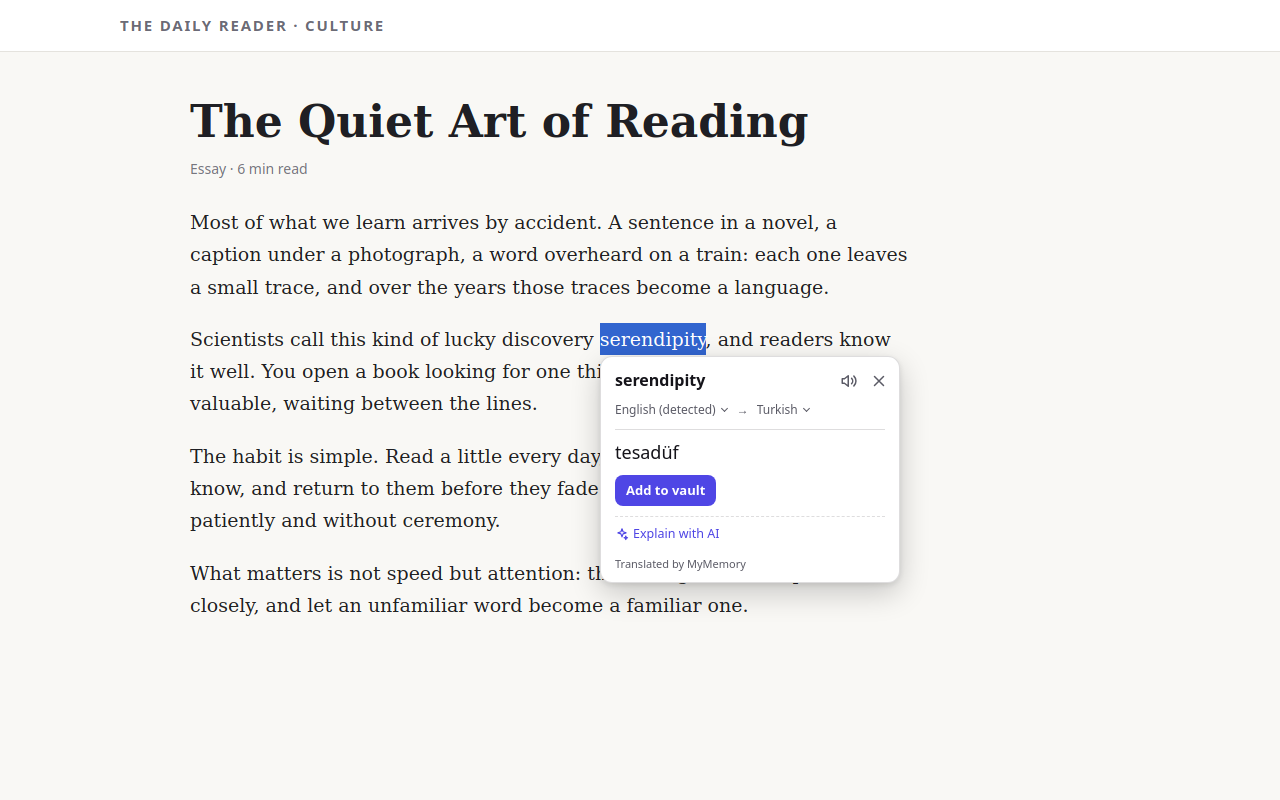
Double-click a word you don't know and its translation opens right next to it. One click saves it to your vault, with the sentence you found it in, and Wordvault brings it back in short flashcard quizzes until you know it. Everything runs in your browser: there is no account, and Wordvault has no server that receives your words or the pages you visit.
Features
- Translate in place: double-click a word, select a sentence or paragraph (right-click menu, "Translate" button or shortcut), or point at a word in YouTube captions. Pronunciation included.
- Scan text on screen: drag over a paused video or an image and click the words; the text is recognised on your device (English and Turkish text).
- Your vault: saved words with their sentence, Wiktionary definitions and examples; search, filter, export and import.
- Flashcard quizzes: four ways to practise (pick, type, listen and pick, listen and type), spaced repetition, a daily goal, a streak and ranks.
- Optional AI features with your own provider (an API key for Google Gemini, Anthropic's Claude, NVIDIA or an OpenAI-compatible service, or Ollama on your computer): explain a word or passage, ask about an area of the screen, summarise or translate a page, and make a printable A4 practice test from your vault. Off until you connect a provider.
- Optional sync through your browser's sync, your own Google Drive or your own WebDAV server, optionally encrypted with your password. Off until you turn it on.
- Translations come from MyMemory by default, or from DeepL with your own API key. Interface in English and Turkish.
Install and build
There are no dependencies: Node.js 22.2 or later is enough.
node build.js              # dist/chrome and dist/firefox
npm test                   # unit tests
Load dist/chrome with "Load unpacked" on chrome://extensions (developer mode), or dist/firefox
from about:debugging in Firefox. How the store packages are made and checked against the source:
BUILD.md. Google Drive sync needs a one-time setup: SETUP-OAUTH.md.
Privacy
No account, no ads, no analytics, no tracking. What leaves the browser, when and where to: privacy policy (source: PRIVACY.md).
Feedback and support
Bug reports and ideas: GitHub Issues. The extension also has a feedback form (Settings → Contact) that shows exactly what it will send before sending.
License
Wordvault is source-available under the PolyForm Noncommercial License 1.0.0: you may read, study, change and share the code for any noncommercial purpose. Commercial use is not permitted.
The bundled third-party libraries keep their own licences: Tesseract.js, tesseract.js-core and the
Tesseract language data (Apache-2.0) under src/vendor/tesseract/, and Mozilla's Readability
(Apache-2.0) under src/vendor/readability/. Dictionary content comes from Wiktionary (CC BY-SA 4.0).
Details: src/THIRD-PARTY-NOTICES.md.
The rest of this file is the developer documentation: how each part works, and why.
Building
No dependencies, no bundler. Node.js 22.2 or later is enough.
node build.js            # produces dist/firefox and dist/chrome
node build.js --watch    # rebuilds whenever src/ changes
node build.js firefox    # one target
node build.js --release  # for the stores (see "Interface language")
npm run package          # release build of both targets, zipped into web-ext-artifacts/
The tests have no dependencies either (Node's built-in node:test):
npm test                 # every test under tests/
npm run i18n:check       # checks the interface translations against the English source
build.js only copies the src/ folder and writes the browser-specific manifest
(manifest.firefox.json or manifest.chrome.json) next to it as manifest.json. Before copying it
checks that the files named in the manifests exist, that the version number matches
package.json, that the two manifests' permissions agree, and that the interface translations are
sound (see "Interface language").
Loading it into a browser
Firefox (142 and later): about:debugging#/runtime/this-firefox → Load Temporary Add-on… →
dist/firefox/manifest.json. After a code change press Reload on the same page.
Chrome (116 and later): chrome://extensions → turn on Developer mode → Load unpacked →
the dist/chrome folder. After a code change press the reload icon on the extension's card.
Reload the open tabs too after the extension was reloaded; the content script in old tabs loses its connection to the extension.
Opera runs the Chrome package (dist/chrome), in normal tabs. Opera's sidebar panels (X/Twitter,
messengers) are not tabs: extensions' content scripts may not run in them (Opera forum reports differ
by panel; there is no official statement), so double-click, selection and screen scanning may do nothing
there. Open the page in a normal tab instead; the toolbar popup says this once in Opera. Opera lists
i18n.getUILanguage() and identity.getRedirectURL() as unsupported (help.opera.com/en/extensions/apis/);
the code falls back to navigator.language and to the Chromium redirect address. Not tested in Opera.
Troubleshooting in Opera: (1) try the same word in a normal tab; (2) check that the extension is enabled
in opera://extensions; (3) reload the tab after installing or updating the extension.
Project layout
SPEC.md, SPEC-SYNC.md,  What is wanted (the extension, synchronisation and its interface, flash cards,
SPEC-SYNC-UI.md,        the quiz's scheduler and display). The SPEC files are the owner's
SPEC-QUIZ.md,           specifications and stay in Turkish.
SPEC-QUIZ-POPUP.md,
SPEC-CAPTIONS.md        Translation on hover over words in video captions
SPEC-OCR.md             Reading text from the screen (OCR) and translation on hover
SPEC-SUPPORT.md         Support link, contact/feedback and store preparation
SPEC-SELECTION.md       Translating a selected sentence or paragraph (right-click, "Translate" button, shortcut)
SPEC-AI.md              AI features (with the user's own provider); all three stages done (stage 3 experimental)
SPEC-I18N.md            The interface language: own loader, fifteen languages, right-to-left
feedback-worker/        The feedback receiver (Cloudflare Worker → Telegram/Discord), with its own README
manifest.firefox.json   Firefox manifest (background.scripts, gecko settings)
manifest.chrome.json    Chrome manifest (background.service_worker)
build.js                Produces the dist/ folders
tools/make-icons.js     Produces the PNGs under src/icons (only when the design changes)
tools/package.js        Release build and store zips
tools/check-locales.js  npm run i18n:check (the check itself: tools/i18n/check.js)
tools/i18n/descriptions.json  What each interface string is for (context for translators; not packaged)
tools/self-hosted-server.js  A one-file example server for "My own server" (see docs/self-hosted.md)
docs/self-hosted.md     Self-hosted mode: WebDAV, the HTTP endpoint's protocol, the example server
docs/store/             Store preparation: listings (en, tr), permission reasons, data declaration, reviewer notes, images
BUILD.md                How the store packages are built from the source, and how to check them
LICENSE                 PolyForm Noncommercial 1.0.0 (Wordvault's own code; vendored libraries keep theirs)
RELEASE-CHECKLIST.md    The steps of a release, with the placeholders still to fill in
docs/privacy.html       The web version of the privacy policy (en + tr), for GitHub Pages
SETUP-OAUTH.md          The one-time developer setup for the cloud providers
PRIVACY.md              Privacy policy: what leaves the browser, when, and where to
tests/                  node:test tests (browser APIs come from an in-memory stand-in)
src/
  config.js             The publisher's addresses: SUPPORT_URL (support page), FEEDBACK_ENDPOINT
  locales/              Interface strings, one flat JSON file per language (en.json is the source)
  _locales/             Only what the browser shows itself: name, description, shortcut descriptions
  support/              The "Support the project" card, button and small link (support.js, support.css)
  welcome/              The welcome page, opened once after the first install
  background/           Background script: message routing, all network requests
    i18n.js             The interface language in the background (menu, notifications, toolbar title)
    menus.js            The right-click menu, built in one place
  shared/               Interface parts used both by the scripts added to pages and by the
                        extension's pages (classic scripts, a shared WV namespace)
    i18n.js             Interface language: loader, placeholders, plurals, language list (loaded first)
    dom.js              Element builder, messaging, Shadow DOM surface, open connection to the background
    styles.js           Colours, buttons and the translation popup's CSS
    language-list.js    Language names and the searchable language list
    speech.js           Pronunciation: the browser's voice (speechSynthesis) or a recording (Web Audio)
    stopwatch.js        Answer time: a stopwatch that runs only while the page is in front of the user
    quiz-card.js        The quiz interface: one component; the card on a page, the popup and the
                        separate window use the same code
  content/              Scripts added to web pages
    selection.js        Selection, context sentence and language helpers
    quiz.js             Shows the quiz on the page; the "is now a good moment" checks (the settings page loads it too)
    translate-button.js The "Translate" button next to a selection; answers the menu's and the shortcut's request
    triggers.js         What opens the popup (double-click)
  ui/popup/popup.js     The translation popup (bubble): the same popup for selected text and for a word
                        a word source found (openForHit)
  core/hover/           The "word under the pointer" pipeline; independent of any feature
    word-source.js      The WordSource contract: a source that gives the word at a point on screen (text,
                        line, rectangle) and says when the text has gone
    words.js            Word boundaries (Intl.Segmenter), sound descriptions, split lines
    text-point.js       From a point to a word in DOM text: caretPositionFromPoint + Range
    highlight.js        Highlights the word with the CSS Custom Highlight API (adds no element to the page)
    tracker.js          When hovering counts (150 ms wait)
    hover.js            Connects the source to the pointer and the translation popup
  features/captions/    The captions feature: only picks the site's adapter
    selectors.js        Every selector used in the sites' players (one place)
    adapters/youtube.js YouTube captions, as a word source
    adapters/dom.js     Captions drawn as text: Netflix, Prime Video, Udemy, Video.js (Brightcove) … (table in selectors.js)
    adapters/tracks.js  Captions the browser draws itself (<track>): drawn again in a layer of our own
  features/screen-ocr/  Reading text from the screen
    background.js       Ways to start it (shortcut, right-click menu, toolbar menu, vault button);
                        in Chrome adds the content scripts to a tab that has none
    scan.js             Takes the screenshot and has it read (Chrome: offscreen document, Firefox: background page)
    offscreen.html/.js  Chrome's offscreen document: reads the image, returns only the words
    pipeline.js         Crop, scale, preprocess, read, filter, place on the page; shuts the engine down after 60 s idle
    preprocess.js       Preprocessing profiles (plain, inverted, locally inverted, caption), scaling, black-frame detection
    filters.js          Dropping false boxes (confidence, symbol, size, shape, very short word), merging readings
    geometry.js         The page's CSS pixels <-> the screenshot's pixels; grouping into words/lines/blocks
    languages.js        Language code mapping (BCP-47 <-> Tesseract), what "automatic" means
    engines/            The engine interface (index.js) and the Tesseract.js engine; no test engine in the product
    content/            The part on the page (top frame only): area.js (the area's rules),
                        selector.js (choosing the area), layer.js (text layer), screen-ocr.js (flow, word source)
  vendor/tesseract/     Tesseract.js 7.0.0, its core and English/Turkish language data; unchanged
                        official files, their versions and SHA-256 sums in README.md there
  popup/                The vault the toolbar icon opens: list, search, details, export
  options/              Settings page: interface language, target language, double-click, flash card
                        settings and diagnostics, backup (export/import) and sync (options/sync.js)
  lib/                  ES modules shared by the background script and the extension's pages
    translator.js       Target/source language decisions and the provider call
    text-damage.js      Recognises text that lost letters on the way ("e?itle")
    settings.js         Settings and the per-site source language
    vault.js            The vault store
    dictionary.js       Wiktionary: part of speech, definition, example sentence
    pronunciation.js    Finds and downloads pronunciation recordings on Wikimedia Commons
    backup.js           JSON export/import
  providers/            Translation providers (common interface: providers/index.js)
  quiz/                 Flash cards
    scheduler.js        Scheduler (chrome.alarms), showing the quiz, recording the answer, diagnostics
    display.js          Ways of showing it (popup, separate window, card on the page, notification) and
                        falling from one to the next
    session.js          The quiz on screen: questions in a row, counters, summary
    quiz.html, page.js  The page that shows the quiz in the popup and in the separate window
    learning.js         Learning algorithm: answer quality, next review, difficulty, state (TUNING)
    selection.js        Choosing the next word (SELECTION)
    question.js         Questions and choices
  sync/                 Synchronisation
    engine.js           Sync engine: read, merge, write, apply locally; lock, retries, alarms
    codec.js            The stored form of the document (gzipped JSON)
    state.js            Sync setting and status (storage.local only)
    config.js           Developer configuration: OAuth client IDs (placeholders), file name
    oauth.js            Signing in: PKCE and implicit flow with launchWebAuthFlow; no client secret
    crypto.js           Optional encryption: PBKDF2 + AES-256-GCM, keeping the key
    bytes.js            Base64 helpers
    request.js          Requests to providers: what network errors and status codes mean
    providers/          Providers (common interface: providers/index.js)
      browser.js        Browser sync (chrome.storage.sync, in pieces)
      gdrive.js         Google Drive (appDataFolder, drive.appdata scope only)
      webdav.js         Own server: WebDAV (PROPFIND, GET, PUT + If-Match)
      http.js           Own server: simple HTTP endpoint (GET/PUT /vault)
      server.js         Checks the address the user enters (https only; localhost excepted)
    model.js            The synced document's format; vault record <-> sync record
    merge.js            Merging two documents, cleaning up deletion records
    local.js            Reading this device's vault as a document and applying a document to the vault
  icons/
All interface added to pages lives inside a closed Shadow DOM: the page's CSS cannot reach the extension and the extension's CSS cannot reach the page. The page's own content is not changed.
Video captions (YouTube, streaming and course sites)
Holding the pointer over a word in a video's captions for about 150 ms opens the translation
popup, whether the video is playing or paused. The word is found from the pointer's position
(caretPositionFromPoint, or by measuring the letters) and its boundaries come from
Intl.Segmenter; the captions' DOM is not touched, the highlight uses the CSS Custom Highlight API.
The source language is detected locally from the whole caption line (the page's language is not
the captions' language). "Add to vault" saves the word together with the caption line. The open
popup stays where it is when the captions are redrawn or disappear, and it never covers a caption
line. Sound descriptions like ♪ and [Music] do not count as words.
There are two layers: core/hover/ and ui/popup/ know nothing about captions, only the
WordSource contract (see core/hover/word-source.js); features/captions/ implements that
contract. Another source (for example text recognised in an image) can later use the same pipeline
with its own wordAt. captions.js asks three adapters in turn, one pointer pipeline for all:
| Adapter | Where | How |
|---|---|---|
youtube.js |
YouTube, embedded players included | YouTube's caption DOM; checked in the real embedded player on 12 October 2026 |
dom.js |
Players that draw captions as text in the page; the entries in selectors.js (dom) |
The caption under the pointer is found by its box, not by the element under the pointer: many players draw captions in a layer the pointer passes through (pointer-events: none) or cover them with a transparent control layer. The word is looked for in the row under the pointer only (rows split by <br> or in separate elements do not run together). |
tracks.js |
A <video> whose captions the browser draws itself (a <track> in "showing" mode: plain HTML5 players, MediaElement.js, Video.js in Safari) |
Those captions are not in the DOM. The track is switched to "hidden" (the browser stops painting it, its cues stay current) and the same captions are drawn in a layer of our own (closed shadow root, top layer, no pointer events), above the browser's control bar when the video shows it. Turning captions off in the player removes the layer; when the feature stops, the track is given back to the browser. A player that keeps switching the track back on is left to the browser after three rounds. Cue positions and VTT styling other than <b>, <i>, <u>, <ruby> are not reproduced. |
Entries of dom.js (features/captions/selectors.js, the one file to update when a site changes):
| Player or site | Status |
|---|---|
| Video.js (Brightcove: Cisco's training videos; Moodle, LinkedIn Learning and other course sites built on it) | Checked: Brightcove's real player (Video.js 8.23.4) with a Cisco Networking Academy video playing in Firefox, and Video.js 8.23.4 from the |