
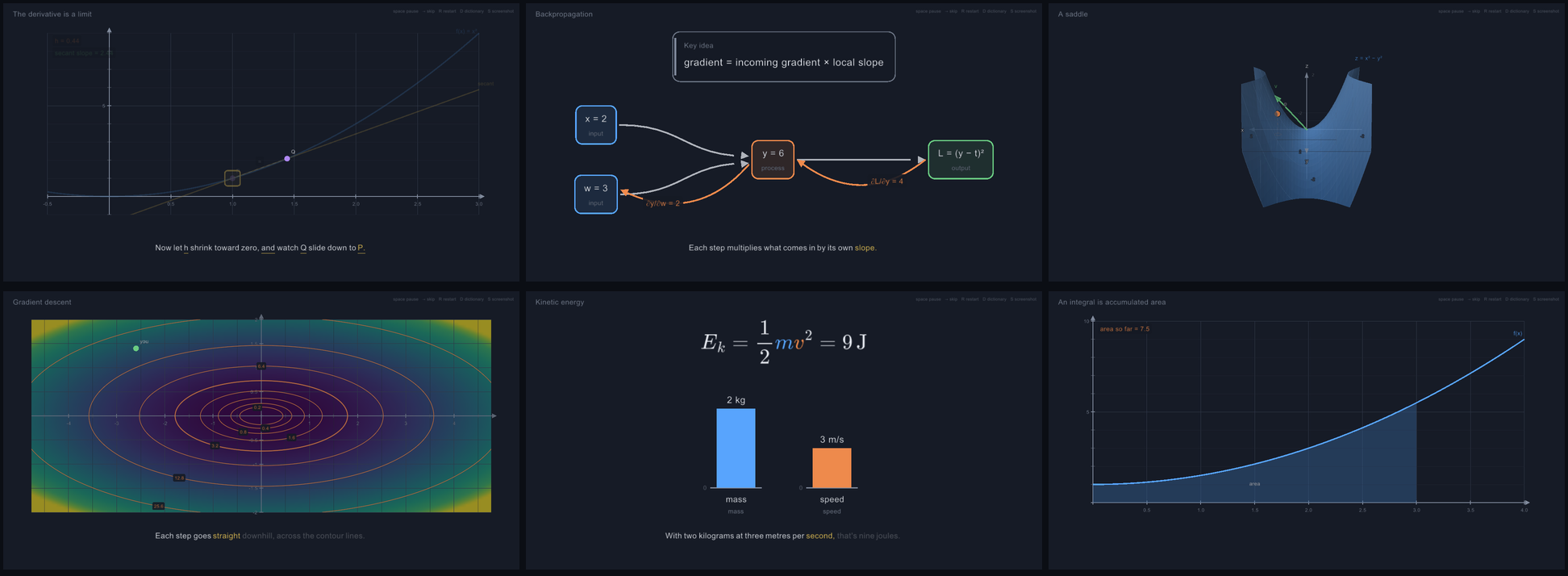
A visual AI tutor that explains by drawing and speaking, in the spirit of 3Blue1Brown.
You ask a question. Claude answers in a small declarative markup called Dan. A C++20 engine built on raylib draws it, animates it, narrates it with streaming text-to-speech, and reads it back to check that the picture means what the words say. Claude never gives a pixel: the engine owns layout, timing, colour, scales and the camera, so the picture stays honest.
title "How a bank transfer works"
mark alice bar account balance=100 label="Alice" unit=$
mark bob   bar account balance=20  label="Bob"   unit=$

Say: "Alice has a hundred dollars. Bob has twenty."
Say: "Alice sends Bob thirty |go|."
@go link pay arrow alice -> bob amount=30
@go morph alice.balance 100 -> 70 1.5s
with morph bob.balance 20 -> 50 1.5s
Say: "Nothing was created or destroyed. Thirty dollars just moved."
Three things happen when this plays. The two bars share one zero and one scale, fixed before the first frame.
The arrow draws itself on the word thirty and both bars ease to their new heights together. At the end,
--readback prints the scene in the same vocabulary, with what changed, so a checker can confirm that the
picture is the one the markup describes.
What it does
| Ask anything | Type on the stage window or in the browser console. Claude plans the explanation, writes Dan one beat at a time, and the stage plays each line while the next is still being written. Formulas are typeset with LaTeX, with one step per sentence and a rest after it. |
| Pause and ask | Press space, type a question about what is on screen, and get a spoken aside about the paused frame. |
| Lectures from files | Give it a paper, notes, code or a JSON file. It plans a lecture in parts of a few minutes, builds each part in a write, check, review, rewrite loop, fetches the voice ahead, and plays it on the stage with checks for understanding at the end of each part. It also writes notes to print: Markdown with LaTeX and mermaid, exported to PDF. |
| From any Claude chat | The tutor is also an MCP server. In Claude Code, the Claude desktop app, or claude.ai in the browser, say "show me this on the stage" and the chat's Claude hands a brief to the tutor, which explains it the way it always does. |
| Save a video | One click renders the lesson to mp4 with the narration. |
| Write Dan yourself | tutor write opens an editor beside the stage. What you type plays as you type it, with the lints and the readback alongside. |
The axioms
The engine enforces six rules, so that a picture can never lie about the words.
- Identity. There is no delete. A re-mark updates in place, and a morph from a wrong value animates from the real one. Nothing jump-cuts.
- Structure. Baselines and scales are shared and fixed for the whole script by a prescan. They never jump mid-explanation.
- Zero. Nothing in the picture without a meaning. Unrelated things never share a colour, and two things touch only when the script relates them.
- Continuity. Every change is an eased morph. Things grow in, links draw themselves, focus fades.
- Bounded focus.
focuslights one thing for one sentence, then everything returns. - Decodability.
--readbackprints the scene as markup, and--checkre-parses it to the same scene.
The rule that follows from them: position comes from structure. There are no placement words. Columns come from links, order from declaration, lanes from groups, and a layered flow, a label placer and an exact overlap checker decide where everything goes. See Axioms, enforced for how each one is kept.
How it works
 you ─── question ───▶ Claude (plan, then Dan, one beat at a time)
                            │
                            ▼  lines, streamed
                      ┌───────────┐   readback + lints   ┌─────────┐
                      │  engine   │ ───────────────────▶ │ checker │ ──▶ fed back to Claude next turn
                      │ (raylib)  │                      └─────────┘
                      └───────────┘
                        │       │
                 stage window   Inworld TTS (word timings drive the cues)
- Prescan. Before the first frame, the whole script is run instantly in a shadow engine, so every scale and baseline is known, and values that are computed later are already counted.
- Layout per frame. Ranges, then the band of formulas, then the schema layout of bodies (free, number line, axes, timeline, graph, 3D space), then pointers and attachments, easing, and finally labels placed map-style with hysteresis. Drawing only reads the results, and the checker sees the same boxes.
- Voice. Inworld's streaming TTS returns word timestamps.
|cue|words in aSayline fire the next drawing line on the word itself, and a spoken number or name gets a pointer on the thing it names. - Lectures. A planner writes an outline and a bible of notation and running examples. A writer builds each
part.
--checklints it (up to three fix rounds), a separate reviewer scores frames and the timeline, and the part is rewritten below 4/5 (up to twice). The best version is kept. Research behind the loop is inresearch_notes/Lecture mode/. - MCP.
chat/mcp/server.mjsexposesshow,ask,stage,notes,lecture,lecture_status,lecture_buildandlecture_playover stdio (Claude Code, the desktop app) and over Streamable HTTP (http.mjs, for claude.ai through Tailscale Funnel on a secret path). The chat's Claude writes only a brief; the tutor's own Claude writes the scene, so the 67K-character teaching prompt never loads into the chat.
Getting started
Requirements: macOS or Linux with a C++20 compiler, raylib 6, Node 22+, and
Claude Code signed in (the chat runs claude -p on your subscription). For the
voice, an Inworld TTS key in ./.inworld_key, $INWORLD_API_KEY, or --inworld-key.
Without one the tutor still plays, with timing estimated from the words.
brew install raylib pkg-config node          # macOS; on Linux, raylib from your package manager or source
make && make tex                             # ./tutor, and MathJax for formulas (once)
ln -s "$PWD/bin/tutor" ~/bin/tutor           # the launcher

tutor                 # build if needed, open the stage and the browser console on your last chat
tutor new             # a fresh chat
tutor write           # the Dan playground: an editor beside the stage
tutor claude          # the tutor in the background, Claude Code in the repo
The engine by itself:
./tutor scripts/derivative.dan                 # play a script, narrated (edit it while it runs: it hot-reloads)
./tutor scripts/derivative.dan --mute          # no voice
./tutor scripts/derivative.dan --record out.mp4
./tutor scripts/derivative.dan --check         # decodability and axiom lints, exit 1 on failure
./tutor scripts/derivative.dan --readback      # the final scene as markup
./tutor scripts/derivative.dan --snapshot out --at 3,8,end    # PNG frames from a hidden window
./tutor scripts/derivative.dan --layout-report -              # JSON: layout score every 0.5 s, the timeline
./tutor live.dan --stdin                       # live mode: lines piped in continue the running scene
Keys on the stage: space pause, → skip, ← back a sentence, shift ←/→ previous or next part, R restart,
D the dictionary caption, S screenshot. Any other key opens the prompt bar.
Lectures
tutor lecture new paper.pdf notes.md --minutes 30 --ask "focus on the intuition"
tutor lecture show        # the outline and the bible: read it, edit the JSON if you like
tutor lecture build       # every part: write, check, review, rewrite; keeps the best version
tutor lecture notes       # notes.md and notes.pdf (LaTeX + mermaid)
tutor lecture play        # on the stage; type to ask, answer the check at the end of each part
The same from the browser at /lectures. A build takes about four minutes per lecture minute at the default
thinking level. The first lecture made this way, from the Transformer paper, was 8 parts and 35 minutes with
33 pages of notes.
From another Claude chat
tutor claude --tools      # Claude Code with the tutor's tools, this session only
tutor mcp install         # the Claude desktop app (once; then quit and reopen it)
tutor mcp web on          # claude.ai in the browser: a Tailscale Funnel URL to add as a custom connector
tutor mcp web off
Notes to PDF
node tools/notes/notes-pdf.mjs notes.md out.pdf # Markdown with $LaTeX$ and ```mermaid blocks, A4
Layout of the repository
| path | what |
|---|---|
main.cpp |
the CLI: play, --check, --readback, --snapshot, --layout-report, --record, --stdin |
markup/script.* |
the parser: verbs, kinds, schemas, [id] pointers and {expr} in Say |
markup/engine.* |
model and timeline: steps, cues, morphs, history, readback, lints, the prescan, the shadow engine |
markup/layout.cpp |
per-frame layout: ranges, the formula band, schema layouts, pointers, easing |
markup/place/ |
pure C++, unit-tested: layered graph flow, VPSC-style separation, the label placer, springs, the exact checker |
markup/placement.cpp, binding.cpp, annotate.cpp, area.cpp, fields.cpp, trails.cpp, camera.cpp, controls.cpp |
the engine's side of placement; words vs picture lints and pointing; notes, areas, fields, trails, the 2D camera, learner sliders |
markup/space.cpp, markup/viz/ |
3D: one CPU projection, shapes, a camera in words, painter's order |
markup/render.cpp |
drawing only, reads layout results |
markup/tts.*, markup/tex.*, tools/tex/ |
Inworld streaming TTS (48 kHz, word timings, disk cache); LaTeX through MathJax to glyph outlines |
rm/raymanim.* |
a small Manim-style animation library on raylib: mobjects, Create, Transform, rate functions, trackers and updaters |
chat/server.mjs, chat/index.html |
the chat: one persistent claude -p per chat, fences to beats, SSE transcript, interrupts, background --check |
chat/prompt.md, chat/toolbox.md, chat/examples/, chat/system-prompt.mjs |
the teaching protocol, 27 checked moves, annotated examples, and the prompt builder (the language section of this README is part of it) |
chat/lecture/ |
lecture mode: store, plan, build, package, player, routes, CLI, and the prompts |
chat/mcp/ |
the MCP server (stdio and HTTP), the desktop app registration, Funnel on and off |
chat/explain.mjs, chat/compute.mjs, chat/ingest.mjs |
pause and ask; sandboxed python blocks; files the learner uploads |
tools/write.*, tools/notes/, tools/eval/, tools/mine/ |
the playground, notes to PDF, the evaluation harness (Claude writes, a judge scores frames), mining 3Blue1Brown's code for idioms |
tests/ |
doctest units (place, viz, parser, engine), golden layout scores, streamed-equals-whole, and Node tests for the toolbox, lectures, notes and MCP |
scripts/*.dan |
39 example explanations |
docs/ |
HANDOFF.md (the map for anyone working on it), history.md (what was tried and measured), guide.html |
reports/, research_notes/ |
research write-ups with sources: the axiom audit, overlap, pacing, spoken-but-not-shown, lecture mode |
Testing
make test        # unit tests: place, viz, parser, engine (97 cases)
make check       # --check over every script in scripts/
make golden      # layout score per script against tests/golden/*.json
make append      # streamed playback == whole playback
node tests/toolbox.mjs && node tests/lecture.mjs && node tests/notes.mjs && node tests/mcp.mjs
Measuring with Claude in the loop (tools/eval/): Claude writes scenes for a question set, a judge scores
frames 1 to 5 on picture and teaching, and sentences.mjs asks whether each spoken claim is shown. The judge's
noise is about ±0.15, so changes are run twice before being believed. Numbers from the history: on 20
derivations, sentences with two or more formula changes went from 15-21% to 0-4%; on spatial questions the 3D
schema raised the picture score from 2.88 to 3.46.
Status
Working and used daily by its author. Built in a few weeks of research-first sessions with Claude: every
feature started as a write-up with sources (reports/, research_notes/), got a baseline, a test that failed on
the old engine, and a look at the frames. docs/history.md is the full log, with the numbers and their noise, and
docs/HANDOFF.md lists what is open.
License
MIT. third_party/ holds nlohmann/json and doctest (MIT). Narration uses Inworld's TTS API under its own terms.
The language
The language is called Dan; its files end in .dan. One line, one statement. # starts a comment.
The six verbs
mark  <id> [kind] [category] key=value ...          a thing and its properties
link  <id> [kind] <a> -> <b> key=value ...          a relation: arrow (cause, maps-to), line (connected), similar, equals
group <id> part-of=[a,b,...] label="..."            a relation: part-of
morph <id>.<prop> [from] -> <to> [1.5s] [ease=..]   a change; the only way anything moves
focus <id> | none                                   what the voice is about (everything else dims, for one sentence)
Say: "text with |hook| markers"                     the voice
Pointing and visibility:
indicate <id> | <array>[k]     a ring pulses on it: point at what the voice names (not part of the model)
send <from> -> <to> [1s]       a copy travels from one thing (a cell a[2], a formula part f[x], a thing) to another,
                               which pulses as it lands: where a value comes from and where it goes
send x -> y via=<link>         the copy travels along that link (a token through a network)
indicate a[0:4] stagger=0.4s   the cells pulse one after another: counting, going through items in order
send a[0:3] -> t stagger=0.3s  each cell's copy goes in turn (parts poured into a total); onto a span as long
                               (send a[0:3] -> b[0:3] stagger=0.3s) each goes to its own cell
hide <id> [0.6s]               fade it to a faint ghost (it stays a thing: opacity=0.12); a note (brace, enclose,
                               cross, …) fades out completely: a faint cross would still say "wrong"
show <id> [0.6s]               bring it back (opacity=1)
Modifiers:
with <line>runs alongside the previous line.@hook <line>waits until the voice reaches|hook|.[id]glued to a word points at that thing as the word is spoken:Say: "each [w11]weight is learned"pulsesw11on "weight". It is the cheapest way to point; use it whenever a sentence names something on stage.{expr}in a Say speaks a value off the stage:Say: "That gives |h|{h}, so cat goes in slot {h}."says the valuehhas when the word is reached (after the lines cued on that word; a morph counts at its end value), and pulseshon that word.{h.y}reads a property,{a + b}an expression, as in properties and\val{}. The voice can't say a number the stage doesn't hold, so speak stage values this way rather than typing them. A value read off the stage still has to be readable on it: a label or a value on the thing.
Annotations: point at a part
An annotation is a thing about other things. It sits where its target is (below something wide, beside something tall, on the side its arrows don't use) and moves with it.
mark s brace of=f[wx] label="weighted sum"      # a brace under the part of formula f written \textcolor{wx}{…}
mark n brace of=[x1,x2,x3] label="3 inputs"     # along several things
mark r enclose of=a[2] label="pivot"            # a box around a thing, a cell, or a part
mark u underline of=a[1:3]                      # a line under cells 1 to 3
mark c cross of=guess                           # wrong (red)
mark k check of=answer label="right"            # right (green)
A target is a thing, an array cell or span (a[k], a[i:j]), or a named part of a formula (f[id], the glyphs inside \textcolor{id}{…}; the name needs no thing of its own). Mark the annotation on the word that names the part (@sum mark s brace of=f[wx] …), and hide it when the sentence moves on.
A bare |go| fires where it sits in the sentence. A marker attached to a word, like thirty|go|, fires when that word is spoken. A marker belongs to its sentence: it fires the @go lines between that Say and the next one, so the same name can be reused sentence after sentence. Names are one word and match regardless of case.
Re-marking an existing id updates it in place, with numbers easing to their new values. It never errors. There is no delete verb (axiom 1).
Links carry names and values
A link is a thing too: give it a name, a value, a colour, and point at it like any mark.
link w11 arrow x1 -> h1 label="w₁₁"                 # a name on the arrow
link w11 arrow x1 -> h1 label="w₁₁" w=0.5           # name and live value: reads "w₁₁ = 0.5"
@learn morph w11.w -> 0.8 1s                         # the number on the arrow changes as it learns
link c1 arrow x1 -> y1 color=yellow                  # same colour = the same thing (a shared weight)
mark f tex tex="y = \textcolor{w11}{w_{11}}\,x_1"     # a symbol coloured like its link
Colours by name: blue, orange, green, red, yellow, purple, teal, pink, brown, lime, white, grey. \textcolor{yellow}{…} works in formulas too.
Mark kinds
- Data:
dotbarboxlabel. - On axes or plane:
linearrowpathregion, plus the world shapes below. - Blocks:
texcardcodearraytable. param: an invisible number that drives others (a clock, a constant). Withset=learner(andrange=[a,b]) the learner sets it: a slider under the stage, and what it drives follows as they drag.
If you leave the kind out, the schema picks one: a bar if the thing has a magnitude, otherwise a dot. Graph scenes use boxes.
World shapes (schema plane, or axes)
schema plane x=[a,b] y=[c,d] is a 2D world where one unit is the same length across and up. Circles are round, angles are true, and things move by morphing their x/y. Options: grid=false, axes=false (a clean world). A scene that only uses world shapes gets plane on its own. For motion, give the ranges, so moving things stay in view.
mark c  circle x=3 y=2 r=1 label="r = 1"
mark k  rect cart x=2 y=1 w=1.4 h=0.9 shape=cart label="1 kg"      # shape=block (default) | cart
mark t  polygon pts=[0,0, 4,0, 1,3]                                 # x,y pairs; each may be {expr}
mark A  angle pts=[0,0, 4,0, 1,3]                                    # vertex, then a point on each ray; shows degrees
mark F  vector force at=k side=right dx=1.5 label="F"                # from a thing (centre or side=left|right|top|bottom)
mark u  vector x=0 y=0 dx=4 dy=1 label="u"                           # or from x y; to: dx dy | to=[x,y] | to=<id>
A vector anchored with at= rides along when its thing moves.
mark G grid space m=[1,0,0,1]                                        # the plane's grid under a 2x2 matrix [a,b,c,d]
@go morph G.m -> [1,1,0,1] 2s                                        # the whole plane shears, smoothly
Lists morph too. morph sq.pts -> [...], morph G.m -> [...] and morph u.to -> [...] glide number by number (same length). Re-marking an array with new items= sends