

Earnote
Free, open-source AI meeting notes for macOS.
Records meetings, calls and lectures, transcribes them on your Mac and writes structured notes into Notion, Obsidian, Apple Notes and more.


English
Why Earnote?
AI meeting notes are great, but usually tied to one app and a monthly subscription. Earnote is a native Mac app that does the same job for free and lets you choose:
- where the transcription runs: always locally (Apple Speech on macOS 26 or Whisper via WhisperKit)
- which AI writes the notes: by default its own on-device model (one download, then private, free and offline), or Apple Intelligence, Ollama, LM Studio, Claude, OpenAI, Gemini, OpenRouter (free models), Mistral, any OpenAI‑compatible server, or your existing Claude Code / Codex subscription
- where the notes end up: Notion, Obsidian, Logseq, Apple Notes, a Markdown folder, Bear, Craft — and tasks into Reminders, Things or Todoist
Features
| 🎙 Microphone + system audio | Captures the other participants in Zoom, Teams, Meet … using Core Audio process taps. No BlackHole or other virtual audio device. |
| 📞 Call detection | Earnote notices when Zoom, Teams, Webex, FaceTime, Slack or a browser call uses your mic and offers to record with a small pop-up. It can also stop the recording when the call ends. |
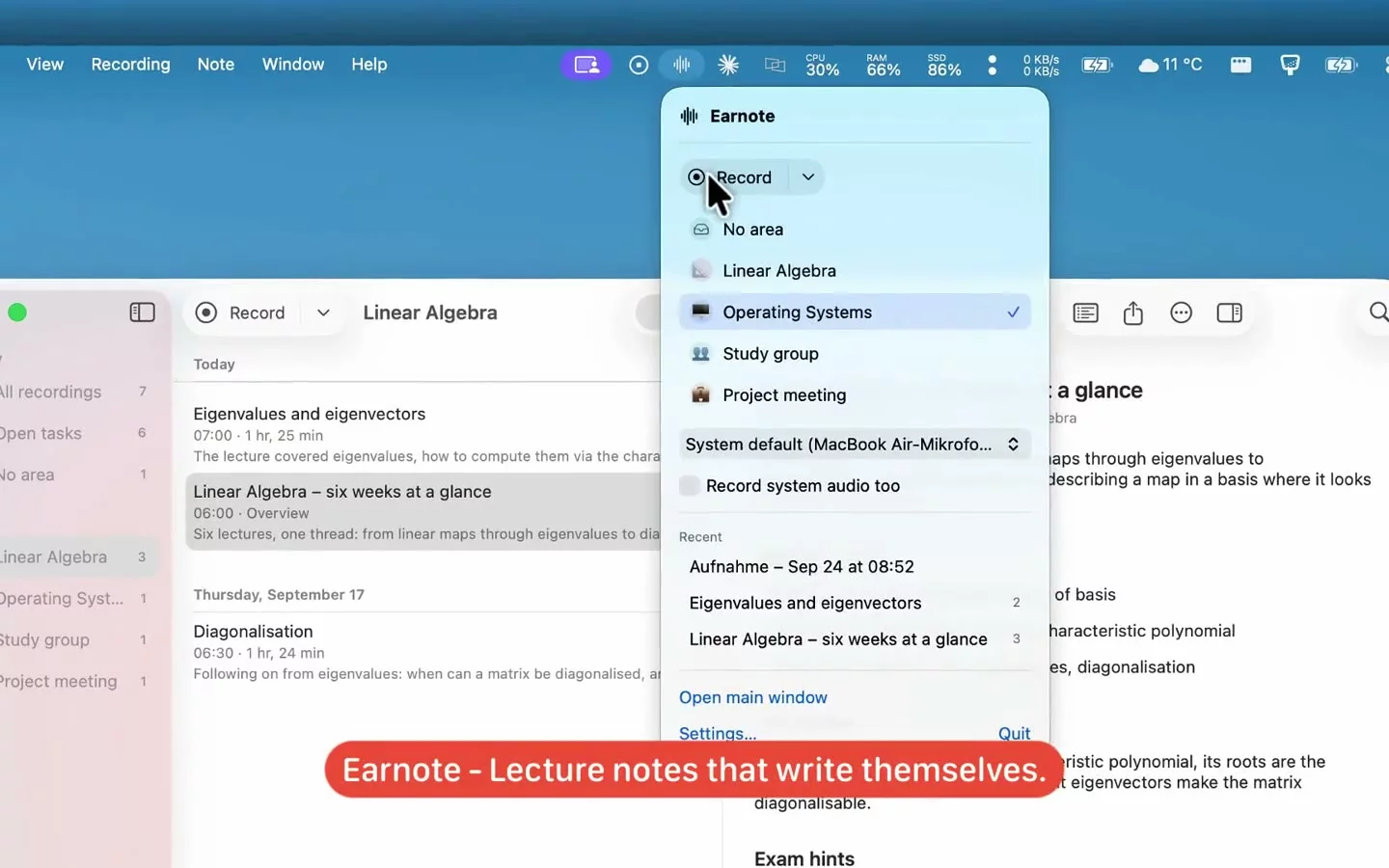
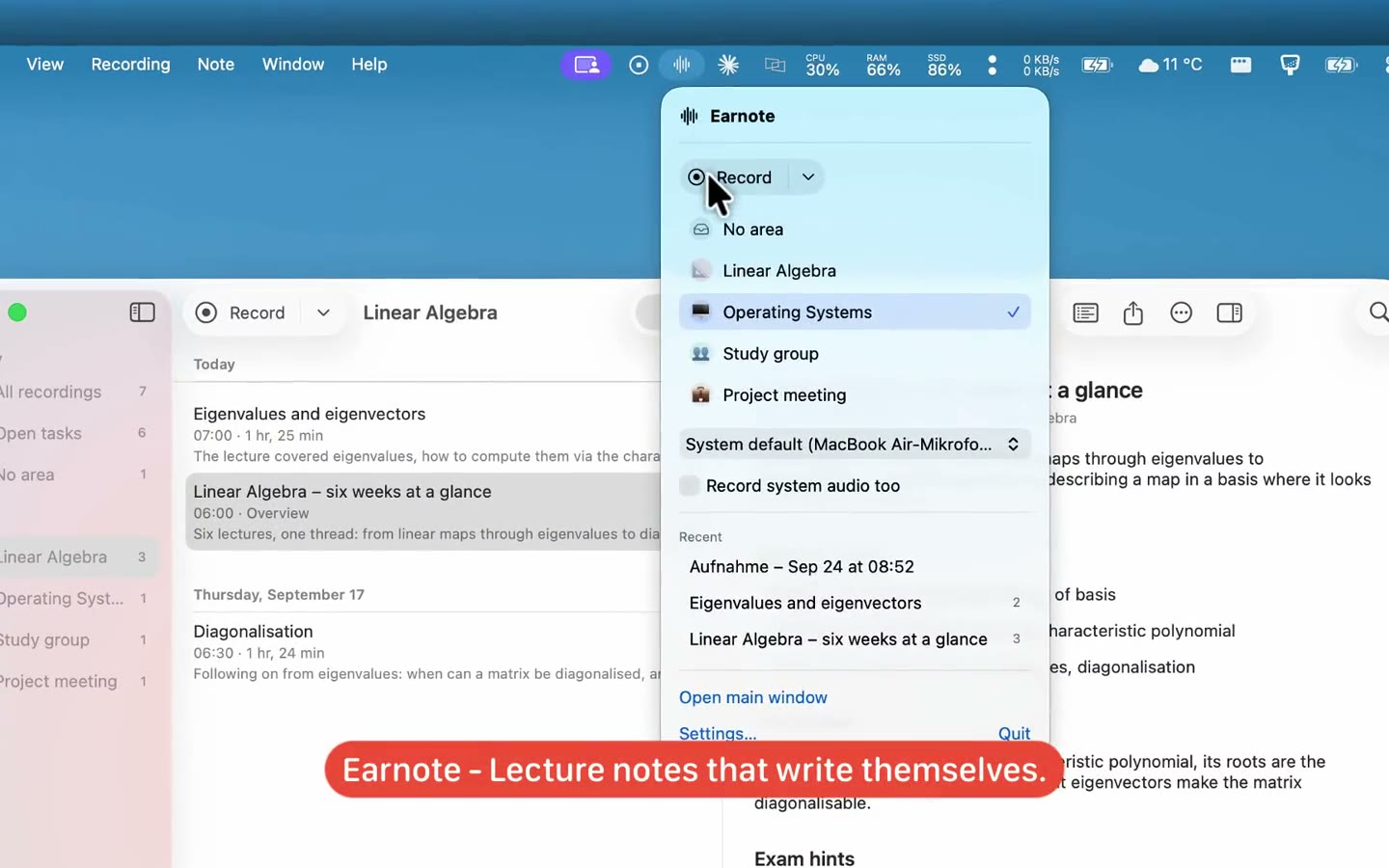
| 🗂 Your own categories | Lecture, client call, interview … each with its own icon, color, summary instructions and export targets. |
| 🗣 Speaker separation | Labels segments as “Me” / “Others” by comparing mic and system audio. |
| ⏱ Long recordings | Handles 3+ hour lectures. Audio is processed in chunks and long transcripts are summarized with map-reduce. |
| 🧭 Setup assistant | Guides you through permissions, model download, AI provider and export targets. No terminal needed. |
| ⏸ Pause & resume | Pause a recording for off-the-record moments (⇧⌘P). Nothing is saved while paused. |
| 🔝 Menu bar | Start, pause or stop recordings, see live levels and recent notes. |
| 📥 Import | Drag any audio file into the window to transcribe it. |
| ▶️ Player | A slim bar under every note: play, ±15 s, and every timestamp in the note and transcript jumps to that moment. |
| 🪟 Note and transcript side by side | ⌘3 shows both; the transcript follows along while the audio plays. |
| 🔎 Search | Find a term in all transcripts, jump through the matches with ⌘G. |
| ⌨️ Global shortcut | ⌃⌥⌘R starts and stops a recording from any app. |
| 📅 Calendar | The running event gives the recording its name. You pick which calendars count. |
| 📄 PDF & print | Save a note as a clean study sheet or print it (⌘P). |
| 🃏 Flashcards | The AI turns a lecture into question/answer cards inside the note — export them as CSV for Anki. |
| ✅ Tasks where you keep them | Open tasks go to Apple Reminders (one list per area, so Structured picks them up), Things or Todoist. |
| 📚 Semester overview | One overview across every lecture of a subject: topics, the thread between them, exam hints. |
| 🧠 Pick your local model | Six on-device models from 1 GB to 17 GB — Earnote preselects the one that fits your Mac's memory. |
| 🧒 Explain it simply | A switch that makes the AI write short sentences and explain technical terms — for school and for anyone new to a subject. |
| 🧹 Storage cleanup | See what the audio files take up and drop the sound of old recordings — notes and transcripts stay. |
| ✉️ Follow-up email | Opens a draft with the note, ready to send to everyone in the meeting. |
iPhone (beta)
Earnote for iPhone is in testing via TestFlight. Put your iPhone on the desk, start recording, turn the screen off. The note is written on your iPhone (iPhone 15 Pro or newer), by your Mac (the iPhone hands the recording over through your own iCloud, the Mac writes the note and sends it back, the audio is deleted afterwards), or with a free Google or OpenRouter key. Live Activity, Control Center and Action button, widgets, flashcards, PDF study sheets, and automatic export to Notion, Obsidian, a folder, Todoist or Reminders. A public TestFlight link follows shortly; the App Store release is planned for the start of the winter semester.
Language
The interface follows your Mac: English or German. Notes are written in the language you choose under Settings › AI, independent of the interface.
Requirements
- macOS 15 or later on Apple Silicon (M1 or newer). Intel Macs are not supported – transcription and the local AI need the Neural Engine.
- About 2.3 GB of free space for the local AI model, 8 GB RAM or more
- macOS 26 or later for Apple Speech and Apple Intelligence
Install
With Homebrew:
brew tap louiskl/earnote && brew trust louiskl/earnote && brew install --cask earnote
Or download the latest Earnote.dmg from Releases and drag Earnote into Applications.
The app is signed with an Apple Developer ID and notarized, so it opens with a double-click – no detour through System Settings.
Earnote checks once a day for a new version, shows what changed and installs it only after you agree. The update file is cryptographically signed. You can turn the check off under Settings › General.
Build from source
- Install Xcode 26 from the App Store.
- Install the Metal toolchain once (needed for the on-device language model):
xcodebuild -downloadComponent MetalToolchain - Open
Earnote.xcodeproj. Xcode resolves the packages (WhisperKit, MLX) automatically. - Press ⌘R.
If you add or remove source files, regenerate the project with python3 scripts/generate_xcodeproj.py.
To build the downloadable dist/Earnote.dmg, run ./scripts/build_release.sh. With an Apple Developer ID it can also sign and notarize; see the comment at the top of the script.
Privacy
- Audio and transcripts stay in
~/Library/Application Support/Earnote. Optional iCloud sync keeps notes and transcripts in your private iCloud database — audio never leaves the Mac. - With the built-in local AI (default), nothing leaves your Mac – ideal for confidential meetings. The same is true for Apple Intelligence, Ollama and LM Studio.
- Only if you pick a cloud provider is the transcript text sent there. Earnote shows a notice when that is the case.
- API keys are stored in the macOS Keychain.
⚖️ Recording other people may require their consent (in Germany, for example, § 201 StGB applies). Always ask first. Earnote shows a reminder.
Status
Earnote is in beta (1.0.1): it works and is used daily, and it gets better every week. If something breaks, tell me – that is exactly what this phase is for. Version 1.0 follows after two weeks of testing with real lectures.
Contributing
PRs are welcome. See CONTRIBUTING.md and the roadmap. Earnote is free. If it saves you time, you can support it on Ko-fi or GitHub Sponsors ♥
Deutsch
Earnote ist eine kostenlose, quelloffene Mac-App für KI-Notizen aus Meetings, Calls und Vorlesungen. Sie ist eine Alternative zu Notion AI Meeting Notes, mit freier Wahl von KI und Ablage.
- Aufnahme von Mikrofon und Systemton (Zoom, Teams, Meet …), ohne Zusatzsoftware, mit Pause-Funktion (⇧⌘P)
- Call-Erkennung mit Pop-up („Zoom erkannt – aufnehmen?“), automatisches Stoppen am Ende des Calls
- Lokale Transkription mit Apple-Spracherkennung (ab macOS 26) oder Whisper
- Zusammenfassung mit der eingebauten lokalen KI, die komplett auf deinem Mac läuft (privat, kostenlos, offline) – oder wahlweise mit Apple Intelligence, Ollama, LM Studio, Claude, OpenAI, Gemini, OpenRouter (kostenlose Modelle), Mistral oder über ein bestehendes Claude-Code- bzw. Codex-Abo
- Ablage in Notion, Obsidian, Logseq, Apple Notizen, einem Markdown-Ordner, Bear oder Craft
- Eigene Kategorien mit eigenen Anweisungen für die Zusammenfassung (z. B. Vorlesung mit Prüfungshinweisen und Lernzettel)
- Sprecher-Unterscheidung in „Ich“ und „Andere“
- Einrichtungsassistent und Bedienung über die Menüleiste, ganz ohne Terminal
- Abspielleiste unter jeder Notiz: jede Zeitmarke springt an ihre Stelle, Notiz und Transkript auf Wunsch nebeneinander (⌘3)
- Suche über alle Transkripte, mit ⌘G durch die Fundstellen
- Globales Tastenkürzel ⌃⌥⌘R: Aufnahme aus jeder App starten und stoppen
- Kalender: Läuft ein Termin, heißt die Aufnahme wie er – welche Kalender zählen, wählst du selbst
- Lernzettel als PDF sichern oder drucken (⌘P)
- Karteikarten: Die KI macht Frage-Antwort-Karten aus der Vorlesung, Export als CSV für Anki
- Aufgaben wandern nach Apple Erinnerungen (je Bereich eine Liste, damit Structured sie mitliest), Things oder Todoist
- Semester-Zusammenfassung: eine Übersicht über alle Vorlesungen eines Fachs – Themen, roter Faden, Prüfungshinweise
- Modellwahl: sechs lokale Modelle (1–17 GB); „Automatisch“ nimmt das passende für deinen Mac
- „Einfach erklärt“: Schalter für kurze Sätze und erklärte Fachbegriffe – für Schule und fachfremde Themen
- Speicher aufräumen: zeigt, was die Audiodateien belegen, und löscht den Ton alter Aufnahmen – Notizen bleiben
- Follow-up-Mail: öffnet einen Entwurf mit der Notiz, verschickt wird nichts von allein
iPhone (Beta): Earnote für das iPhone ist im Test (TestFlight). Handy auf den Tisch, Aufnahme starten, Bildschirm aus. Die Notiz schreibt das iPhone selbst (ab iPhone 15 Pro), dein Mac (das iPhone übergibt die Aufnahme über deine eigene iCloud, der Mac schickt die Notiz zurück, das Audio wird danach gelöscht) oder eine kostenlose KI von Google oder OpenRouter mit eigenem Schlüssel. Mit Live-Aktivität, Kontrollzentrum und Action-Taste, Widgets, Karteikarten, PDF-Lernzetteln und automatischem Export nach Notion, Obsidian, in einen Ordner, nach Todoist oder Erinnerungen. Ein öffentlicher TestFlight-Link folgt in Kürze, der App Store ist zum Wintersemester geplant.
Installation mit Homebrew: brew tap louiskl/earnote && brew trust louiskl/earnote && brew install --cask earnote
Installation von Hand: Earnote.dmg unter Releases herunterladen, öffnen und Earnote in den Programme-Ordner ziehen. Die App ist von Apple notarisiert und startet mit einem Doppelklick – ohne Umweg über die Systemeinstellungen. Earnote schaut einmal am Tag nach einer neueren Version, zeigt die Änderungen und installiert sie erst nach deiner Zustimmung. Die Update-Datei ist signiert; abschalten lässt sich die Prüfung unter Einstellungen › Allgemein.
Fehler melden: In der App unter Einstellungen › Über › „Fehler melden …“ – damit ist der Bericht gleich mit Version, macOS und den letzten Protokollzeilen vorausgefüllt.
Selbst bauen: Earnote.xcodeproj in Xcode öffnen und mit ⌘R starten.
⚖️ Bitte vor jeder Aufnahme das Einverständnis aller Beteiligten einholen (§ 201 StGB).
Unterstützen: Earnote ist kostenlos. Wenn es dir Zeit spart, kannst du es über Ko-fi oder GitHub Sponsors unterstützen ♥ Beta-Tester: Die Kurzanleitung steht in docs/BETA.md. Datenschutz: Was wo liegt und wann die App ins Netz geht, steht in docs/DATENSCHUTZ.md.