
Read this in other languages
English | 简体中文 | 日本語 | 한국어 | Deutsch | Français | Español | हिन्दी | Português | Русский | العربية | فارسی | Italiano | Polski | Nederlands | Türkçe | Українська | Tiếng Việt | Bahasa Indonesia | Svenska | Ελληνικά | Română | Čeština | Suomi | Dansk | Norsk | Magyar | ภาษาไทย | Oʻzbekcha | 繁體中文 | Filipino | עברית










Cut agent token spend by 80%. Graphify Cloud is always-on memory that governs your agents, keeps code quality high, and proves correctness with formal verification. Start a free 14-day trial →
Type /graphify in your AI coding assistant and it maps your entire project (code, docs, PDFs, images, videos) into a knowledge graph you can query instead of grepping through files.
- Code maps for free, fully local. Code is parsed with tree-sitter AST: deterministic, no LLM, nothing leaves your machine. (Docs, PDFs, images and video use your assistant's model, or a configured API key, for a semantic pass.)
- Every edge is explained. Each connection is tagged
EXTRACTED(explicit in the source) orINFERRED(resolved by graphify), so you can tell what was read directly from what was inferred. - Not a vector index. No embeddings, no vector store: a real graph you traverse. Ask a question, trace the path between two things, or explain one concept.
Note
Want this always-on? Graphify Cloud keeps the graph live across your entire SDLC: monorepo and cross-repo support, formal verification, and code review with a bird's-eye view of your SDLC, plus connectors for Sentry, Jira, and more so incidents and tickets sit in the same graph as your code. Start a free 14-day trial at app.graphify.com.
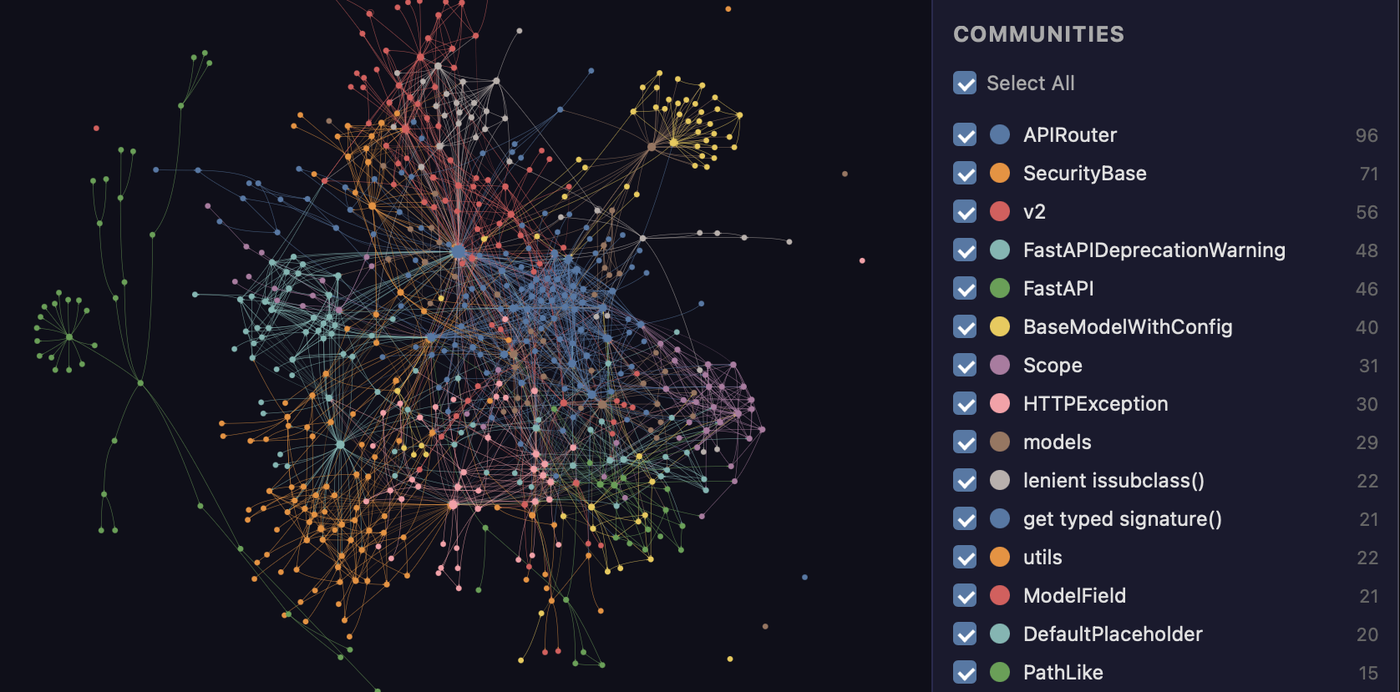
The FastAPI codebase mapped by graphify. Every node is a concept, colors are detected communities, and the whole thing is clickable in graph.html.
Get started (30 seconds). Needs Python 3.10+ and uv (or pipx):
uv tool install graphifyy      # install the CLI (or: pipx install graphifyy)
graphify install               # detects your assistant and registers the skill
Then, in your AI assistant:
/graphify .
That's it. You get three files:
graphify-out/
├── graph.html       open in any browser: click nodes, filter, search
├── GRAPH_REPORT.md  the highlights: key concepts, surprising connections, suggested questions
└── graph.json       the full graph: query it anytime without re-reading your files
The persisted graph includes graph.schema_version so integrations can detect
incompatible format changes, plus graph.graphify_version identifying the
Graphify release that produced it.
One install, any assistant, any OS. Claude Code, Cursor, Codex, Gemini CLI, GitHub Copilot, and 20+ more, on macOS, Linux, and Windows: pick your platform.
See it in action
Once the graph is built you query it instead of reading files. Real output, graphify run on the FastAPI codebase shown above:
$ graphify explain "APIRouter"
Node: APIRouter
  Source:    routing.py L2210
  Community: 2
  Degree:    47

Connections (47):
  --> RequestValidationError [uses] [INFERRED]
  --> Dependant [uses] [INFERRED]
  --> .get() [method] [EXTRACTED]
  <-- __init__.py [imports] [EXTRACTED]
  ...

$ graphify path "FastAPI" "ModelField"
Shortest path (3 hops):
  FastAPI --uses--> DefaultPlaceholder <--references-- get_request_handler() --references--> ModelField
Every edge carries a confidence tag (EXTRACTED = explicit in the source, INFERRED = derived by resolution), so you can tell what was read directly from what was inferred. graphify query "<question>" returns a scoped subgraph for a plain-language question, and graphify path A B traces how any two things connect.
What it does
What you get out of the box:
| Capability | What you get |
|---|---|
| God nodes | The most-connected concepts, so you see what everything flows through |
| Communities | The graph split into subsystems (Leiden), with LLM-free labels |
| Cross-file links | calls / imports / inherits / mixes_in resolved across ~40 languages via tree-sitter AST |
| Query, path, explain | Ask a question, trace the path between two things, or explain one concept, all against graph.json |
| Rationale + doc refs | # NOTE: / # WHY: comments and ADR/RFC citations become first-class nodes linked to the code |
| Beyond code | Docs, PDFs, images, and video/audio all map into the same graph |
| Local-first | Code is parsed locally with tree-sitter (no LLM, nothing leaves your machine); only the semantic pass over docs/media calls a backend, and only if you configure one |
Tip
Running this across many repos or a monorepo? Graphify Cloud does it continuously and cuts agent token spend by 80%, with cross-repo links, SDLC-wide code review, formal verification, and Sentry/Jira connectors. Start a free 14-day trial →
Benchmarks: 0.497 recall@10, 0 LLM credits
| Benchmark | Metric | graphify | Field |
|---|---|---|---|
| LOCOMO (n=300) | recall@10 | 0.497 | mem0 0.048, supermemory 0.149 |
| LOCOMO (n=300) | QA accuracy | 45.3% | supermemory 49.7%, mem0 27.3% |
| LongMemEval-S (n=50) | QA accuracy | 76% | tied with dense RAG |
| ERPNext cross-tool (n=6) | key-fact coverage | 82.0% | grep/read baseline 70.8% |
| Graph build | LLM credits | 0 | per-token for most systems |
Every system ran on the same harness with the same model and budgets, scored by a judge blind-validated against a second judge (90.6% agreement, Cohen's kappa 0.81). Full per-system tables, the code-intelligence result, and reproduction commands: BENCHMARKS.md.
Documentation
Full guides and reference live at docs.graphify.com:
- Quickstart: build your first graph
- CLI reference: every command and flag
- Ask better graph questions: querying patterns
- Configuration: environment variables and tuning
- Supported inputs: languages and file types
- Team workflows and PR review
- Troubleshooting and How it works
Prerequisites
| Requirement | Minimum | Check | Install |
|---|---|---|---|
| Python | 3.10+ | python --version |
python.org |
| uv (recommended) | any | uv --version |
curl -LsSf https://astral.sh/uv/install.sh | sh |
| pipx (alternative) | any | pipx --version |
pip install pipx |
macOS quick install (Homebrew):
brew install python@3.12 uv
Windows quick install:
winget install astral-sh.uv
Ubuntu/Debian:
sudo apt install python3.12 python3-pip pipx
# or install uv:
curl -LsSf https://astral.sh/uv/install.sh | sh
Install
Important
Official package: The PyPI package is
graphifyy(double-y). Othergraphify*packages on PyPI are not affiliated. The CLI command is stillgraphify.
The official source repository is Graphify-Labs/graphify.
The two-command quickstart is at the top of this README. This section covers the install methods, project-scoped installs, and every supported platform.
Install methods (pick one):
uv tool install graphifyy   # recommended, isolated env (if 'graphify' isn't found after, run: uv tool update-shell)
pipx install graphifyy      # alternative
pip install graphifyy       # may need PATH setup, see Troubleshooting below
Then run graphify install once. It detects which assistant you run and registers the skill, so there is no per-assistant setup. Open your AI assistant and type /graphify .
To install the assistant skill into the current repository instead of your user
profile, add --project:
graphify install --project
graphify install --project --platform codex
Project-scoped installs write under the current directory, for example
.claude/skills/graphify/SKILL.md or .agents/skills/graphify/SKILL.md (plus a
references/ sidecar the skill loads on demand), and
print a git add hint for files that can be committed.
Per-platform commands that support project-scoped installs accept the same flag,
for example graphify claude install --project or graphify codex install --project.
Tip
Hitting
command not found, apip-on-Mac/Windows issue, PowerShell quoting,uvxusage, git-hook PATH quirks, or strict mode? See Installation and Troubleshooting.
Pick your platform (20+ assistants, click to expand)
| Platform | Install command |
|---|---|
| Claude Code (Linux/Mac) | graphify install |
| Claude Code (Windows) | graphify install (auto-detected) or graphify install --platform windows |
| CodeBuddy | graphify install --platform codebuddy |
| Codex | graphify install --platform codex |
| OpenCode | graphify install --platform opencode |
| Kilo Code | graphify install --platform kilo |
| GitHub Copilot CLI | graphify install --platform copilot |
| VS Code Copilot Chat | graphify vscode install |
| Aider | graphify install --platform aider |
| OpenClaw | graphify install --platform claw |
| Factory Droid | graphify install --platform droid |
| Trae | graphify install --platform trae |
| Trae CN | graphify install --platform trae-cn |
| Gemini CLI | graphify install --platform gemini |
| Hermes | graphify install --platform hermes |
| Kimi Code | graphify install --platform kimi |
| Amp | graphify amp install |
| Agent Skills (cross-framework) | graphify install --platform agents (alias --platform skills) |
| Kiro IDE/CLI | graphify kiro install |
| Pi coding agent | graphify install --platform pi, plus graphify pi guard install for the native guard |
| Cursor | graphify cursor install |
| Devin CLI | graphify devin install |
| Google Antigravity | graphify antigravity install |
| Google Antigravity (Windows) | graphify antigravity install (auto-detected on Windows) |
Codex users also need multi_agent = true under [features] in ~/.codex/config.toml for parallel extraction. CodeBuddy uses the same Agent tool and PreToolUse hook mechanism as Claude Code. Factory Droid uses the Task tool for parallel subagent dispatch. OpenClaw and Aider use sequential extraction (parallel agent support is still early on those platforms). Trae uses the Agent tool for parallel subagent dispatch and does not support PreToolUse hooks, so AGENTS.md is the always-on mechanism.
--platform agents (alias --platform skills) targets the generic cross-framework Agent-Skills locations: the spec's user-global ~/.agents/skills/ (read by npx skills and spec-compliant frameworks) for a global install, and ./.agents/skills/ for a project (--project) install. The bare graphify install stays single-platform (Claude Code) by design: use the named agents platform when you want the skill discoverable by any framework that reads .agents/skills.
Pi has no PreToolUse hook, so graphify pi guard install registers a native Pi extension (via Pi's own pi install <package directory>) that runs the installed graphify hook-guard before Pi's read, grep, find and search-style bash calls. Fresh/stale graph decisions and the GRAPHIFY_HOOK_STRICT=1 once-per-session indexed-read denial come from that same policy, so Pi matches Claude Code's hook behavior; guidance arrives as a <system-reminder source="graphify"> steering message. It needs Pi 0.58.4 or newer: earlier versions let a steering message skip the rest of a parallel tool-call batch. The package ships inside the Graphify installation, so install Graphify persistently (uv tool install graphifyy or pipx install graphifyy, not uvx), restart Pi after installing or upgrading, and remove it with graphify pi guard uninstall. Only local file targets are inspected; the hook needs graphify on an absolute PATH entry outside the project, is bounded to a two-second, 256 KiB-in/64 KiB-out call, and fails open. The same package also loads in Oh My Pi: omp plugin install "$(graphify pi guard path)". The registered path contains the Python version and venv, so re-run graphify pi guard install after changing either, and remove the old entry with pi remove <old path>.
Codex uses
$graphifyinstead of/graphify.
Optional extras (install only what you need)
| Extra | What it adds | Install |
|---|---|---|
pdf |
PDF extraction | uv tool install "graphifyy[pdf]" |
office |
.docx and .xlsx support |
uv tool install "graphifyy[office]" |
google |
Google Sheets rendering | uv tool install "graphifyy[google]" |
video |
Video/audio transcription (faster-whisper + yt-dlp) | uv tool install "graphifyy[video]" |
mcp |
MCP stdio server | uv tool install "graphifyy[mcp]" |
watch |
Auto-rebuild on file changes (graphify watch) |
uv tool install "graphifyy[watch]" |
neo4j |
Neo4j push support | uv tool install "graphifyy[neo4j]" |
falkordb |
FalkorDB push support | uv tool install "graphifyy[falkordb]" |
svg |
SVG graph export | uv tool install "graphifyy[svg]" |
leiden |
Leiden community detection (graspologic on Python < 3.13; native backend on 3.13+) | `uv |