
Edit photos by describing the change, on your own computer.
A free, open-source alternative to Nano Banana and Generative Fill that runs on your own GPU. One installer for Windows, Mac and Linux sets up the best open model for your hardware. Brush an area, type what you want, get the edit. Your photos stay with you, and you can edit as often as you like.















Website · Install · Phone & server · Features · Examples · AI agents · FAQ · Prompt guide · How it works
https://github.com/user-attachments/assets/8851c580-99b9-432a-82be-b6d42fa9a749
Watch in 4K on YouTube · What's new in 0.10 (42 s)


Free and open source · about 12 GB of models downloaded on first run · nothing leaves your computer
New in 0.11: use it from your phone, or run it as a server
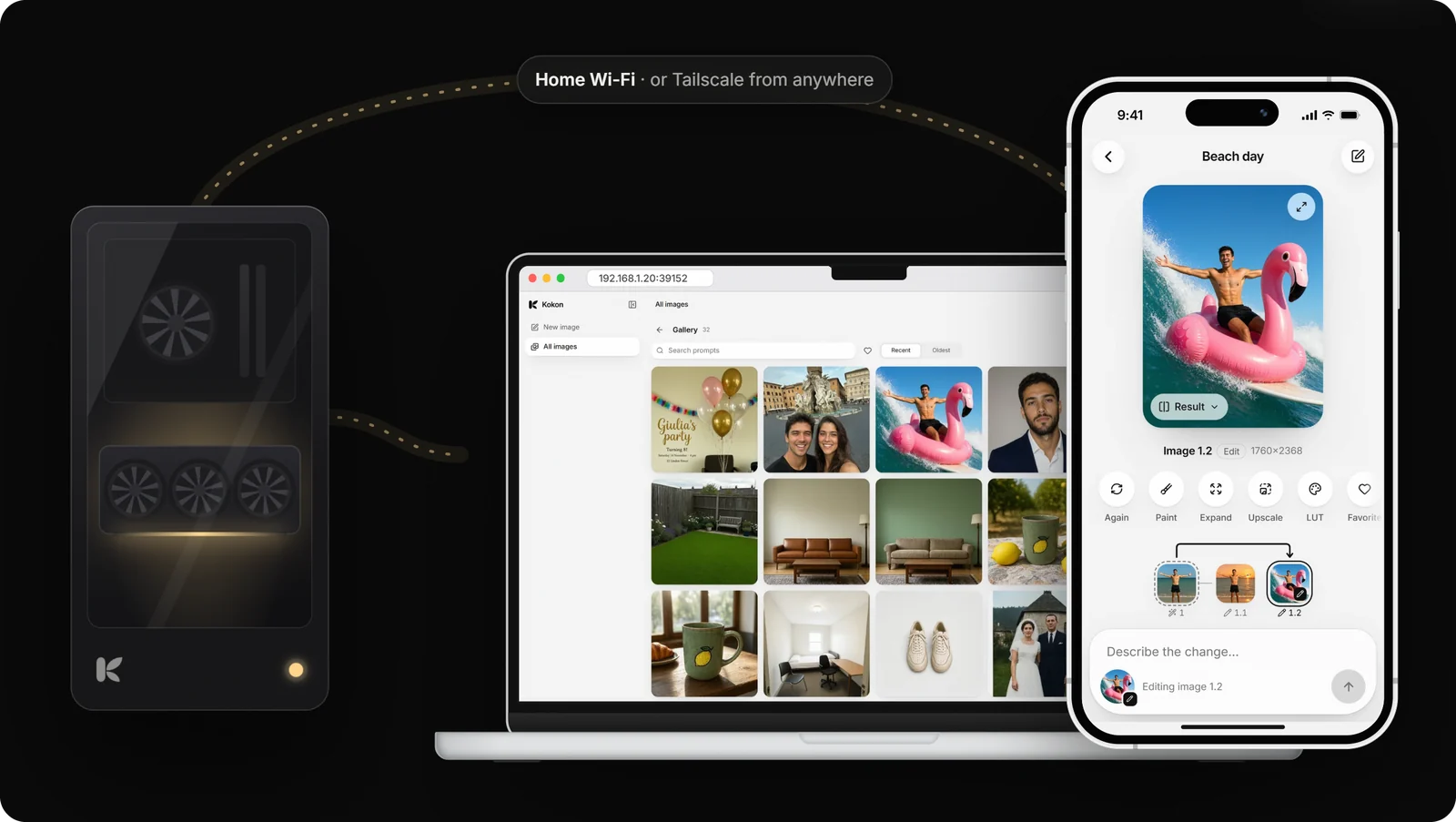
Your computer with the graphics card makes the images; your phone, tablet or laptop uses Kokon in a browser. Nothing goes through a cloud, and there is no account.
https://github.com/user-attachments/assets/ccf8da7c-175d-4d1b-9976-91eaa7bddd09
-
Other devices: open Settings → Other devices, set a password and scan the QR code with your phone. Add Kokon to the home screen and it opens like an app. Off until you turn it on; 5 wrong passwords make that device wait.
-
From anywhere: connect your devices with Tailscale or another VPN. Never open Kokon's port on your router.
-
As a server:
kokon-serviceon a Linux box without a screen, or the Docker image for NVIDIA cards:curl -fsSLO https://raw.githubusercontent.com/GabrieleLozupone/kokon/master/docker/compose.yaml docker compose up -d docker exec -it kokon kokon-service --set-password
Step by step: kokon.app/self-hosted · full reference: docs/remote-access.md and docs/docker.md.
A local alternative to Nano Banana, without the node graph
Cloud editors made "edit a photo with a sentence" normal, but they upload your photos and limit how much you use them. Node-based tools run locally, but you build everything yourself. Kokon is simple and local: we make the technical choices (model, files, steps, memory), you make the edits.
| Kokon | ChatGPT, Gemini (Nano Banana) | Photoshop Generative Fill | ComfyUI | |
|---|---|---|---|---|
| Your photos stay on your computer | ✅ | ❌ uploaded | ❌ Adobe's cloud | ✅ |
| Free, no limits | ✅ it's your GPU | daily limits or subscription | subscription + credits | ✅ |
| Works offline | ✅ after setup | ❌ | ❌ | ✅ |
| Setup | one installer | an account | Creative Cloud | Python, nodes, model files |
| Who picks the model and settings | Kokon, tested for your GPU | the service | Adobe | you |
| Edit with one sentence | ✅ | ✅ | short prompt for a selection | after building a workflow |
Fair to say: cloud models run on data-center GPUs, so they can be faster and stronger on some edits. Kokon runs Qwen-Image 2.1, which leads the open-weights image-editing rankings, on the computer you already have. You need a 12 GB graphics card (8 GB in beta) or an Apple Silicon Mac, and the images are for non-commercial use because of the model's license.
Why Kokon
✍️ Just describe it“Remove all the people from the beach.” “Make it golden hour.” Kokon picks the mode, the resolution and the memory settings for you. There are no sliders to learn. Only have a short idea? Prompt+ writes the detailed prompt for you, in any language. |
🔒 Private by designEverything runs on your own GPU. No account, no uploads, no telemetry, no limits. After setup, Kokon only checks once a day for a new version (you can turn that off). A private mode keeps nothing at all. |
📦 One installerA native app built on stable-diffusion.cpp. No Python, no ComfyUI, no node graphs. The first run detects your graphics card or your Mac's memory and downloads the right model, then verifies it. Updates install in one click. |
🎯 Edits that stay in placePaint over an area and choose Change, Remove, Replace or Add. Kokon shows the model exactly where to work, so the rest of the photo stays untouched. |
🖼️ Full-size resultsKokon keeps your photo's size and aspect ratio, and enlarges with an AI upscaler instead of blurry resizing. It also opens iPhone HEIC photos, HDR included. |
🤖 Works with your AI agentA built-in MCP server and local HTTP API let Claude, Cursor or your own scripts create and edit images on your machine. |
Examples

One project, six steps in Kokon: generate the Colosseum, rebuild it out of pasta,
add a tomato sauce river, generate the kitchen, combine the two, expand to 21:9.
Every image below was made by Kokon itself (no stock photos), first try with that seed. Prompts, seeds and times are in marketing/showcase/PROMPTS.md.
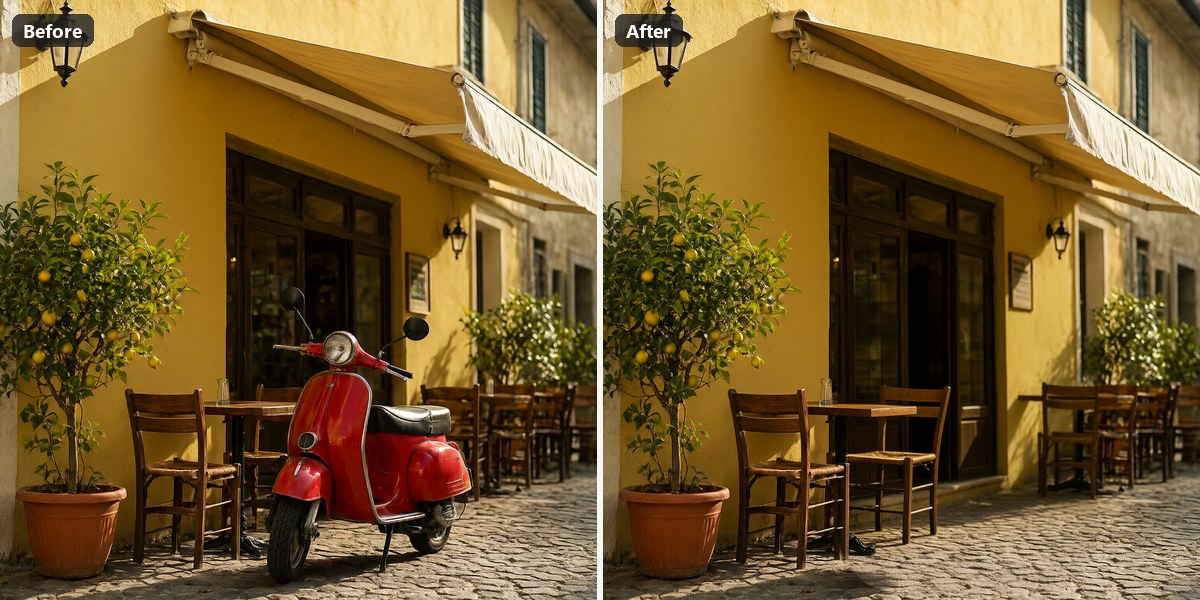 Remove · paint the scooter · “the red scooter” |
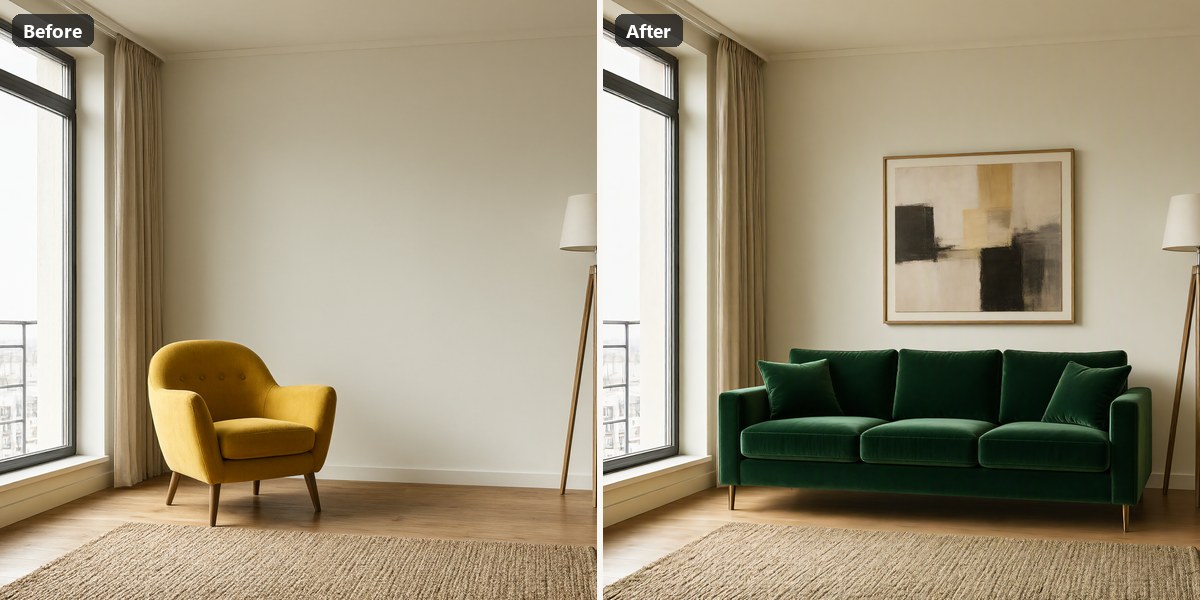 Replace · “Replace the yellow armchair with a deep green velvet sofa and hang an abstract painting above it” |
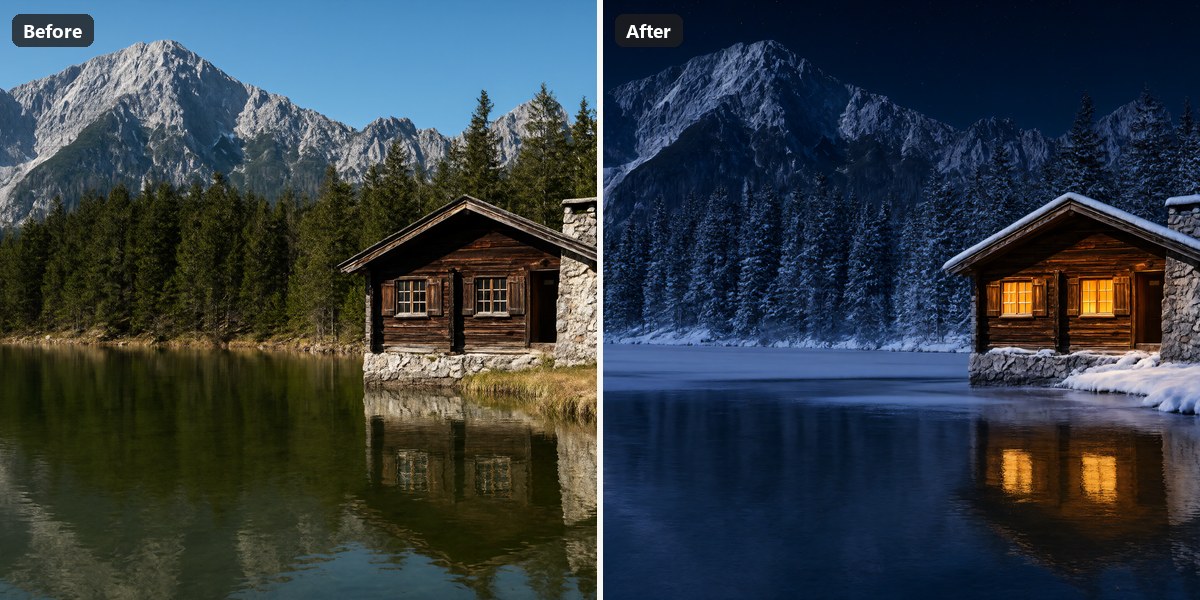 Relight · “Make it a snowy winter night, warm light glowing from the cabin windows” |
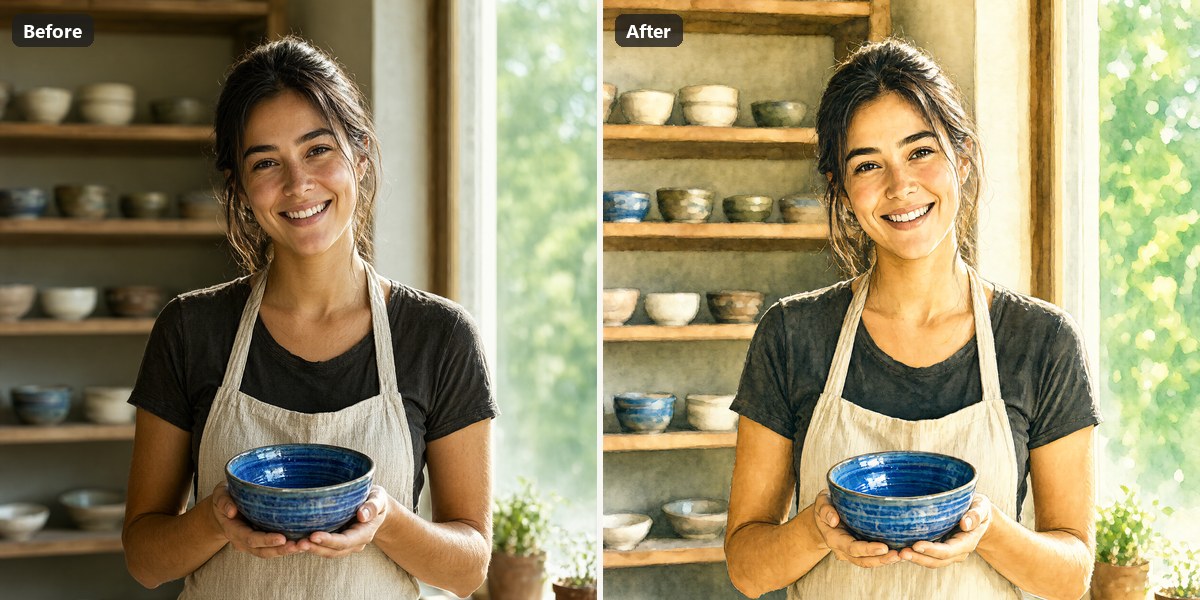 Restyle · “Turn it into a hand-painted watercolor illustration” |
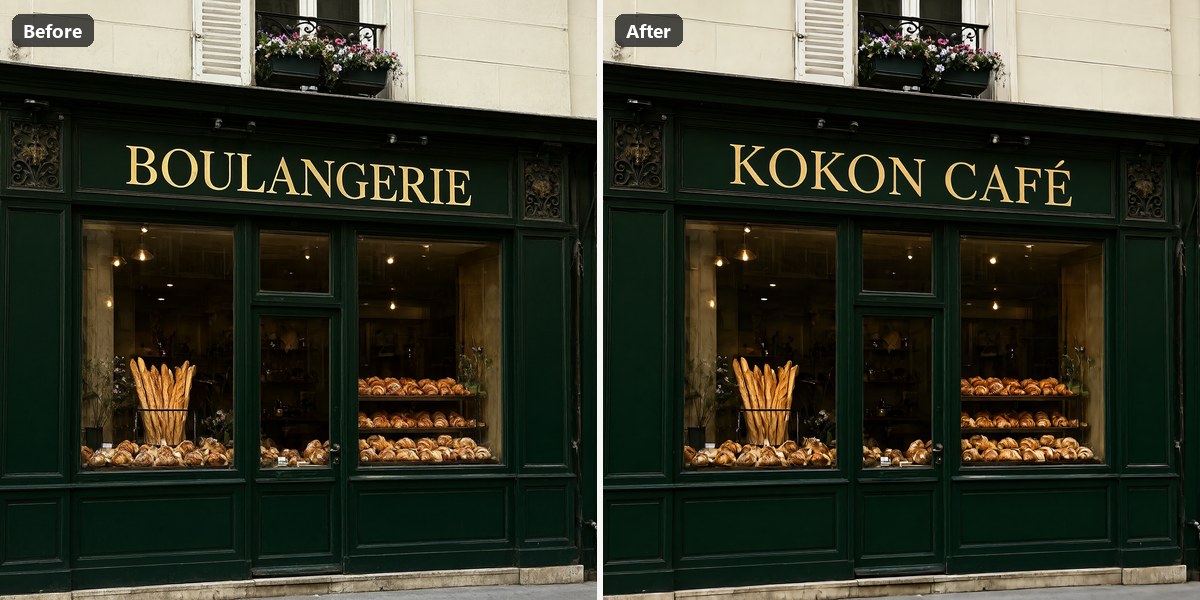 Text · “Change the gold sign text to ‘KOKON CAFÉ’” |
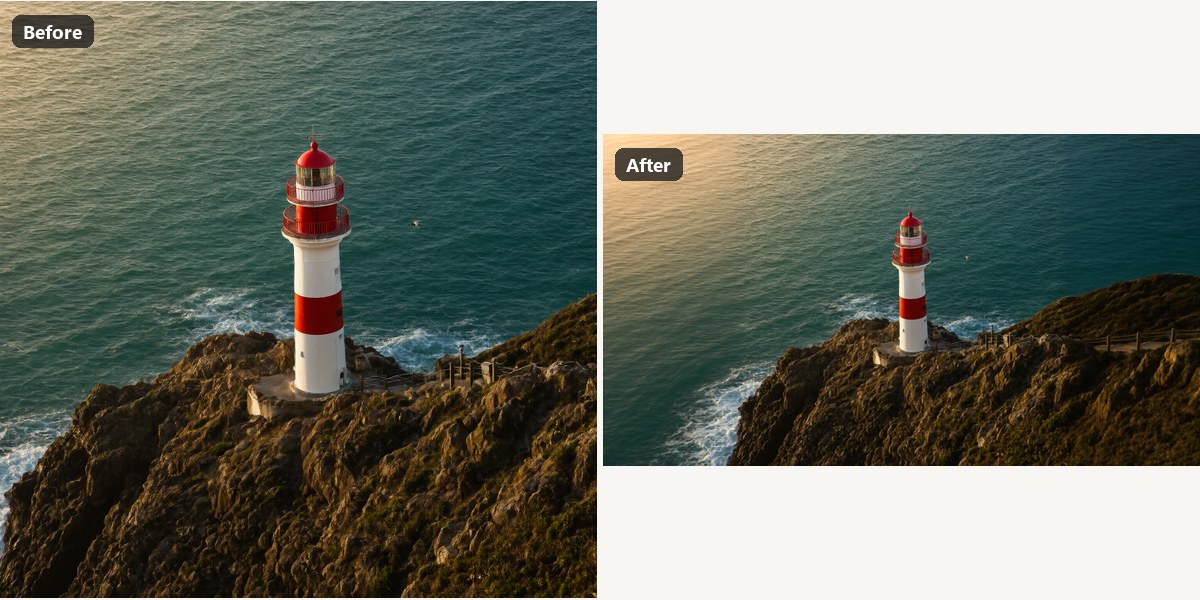 Expand · 40 % left and right · “continue the rocky coastline and the turquoise sea” |
Install
1. Download from the latest release:
-
Windows:
Kokon_<version>_x64-setup.exe. Run it. It installs for your user only, so you don't need administrator rights. -
Mac (Apple Silicon, beta):
Kokon_<version>_aarch64.dmg. Open it and drag Kokon to Applications. The first time, macOS blocks it because the app is not notarized by Apple: open System Settings → Privacy & Security and click Open Anyway, or run one Terminal command if there is no such button (details). -
Linux (x86-64, beta):
Kokon_<version>_amd64.debfor Ubuntu, Debian and Mint, orKokon-<version>-1.x86_64.rpmfor Fedora. Install it with your package manager, which also pulls in the few libraries it needs:sudo apt install ./Kokon_<version>_amd64.deb # Ubuntu 22.04+, Debian 12+, Mint 21+ sudo dnf install ./Kokon-<version>-1.x86_64.rpm # Fedora 40+For NVIDIA cards you need the proprietary driver (the CUDA runtime comes with Kokon). AMD and Intel cards use Mesa's Vulkan driver, installed on most desktops already. If apt prints "Download is performed unsandboxed as root", that's harmless (apt can't read your home folder); copy the .deb to
/tmpfirst to avoid it. -
Server or Docker (NVIDIA): Kokon without a window, used from a browser on any device. The image
ghcr.io/gabrielelozupone/kokonis published with every release: see docs/docker.md, or runkokon-servicefrom the Linux packages (docs/remote-access.md).
2. Set up models. On first launch Kokon shows your graphics card (or your Mac's chip and memory), recommends a preset and downloads everything it needs. The download resumes if it is interrupted and every file is checked against its SHA-256 checksum. On a fast connection the whole thing takes a few minutes, and the setup screen shows what Kokon can do while you wait.
3. Edit. Drop or paste a photo, describe the change and press Enter.
Requirements
Windows
| Minimum | Recommended | |
|---|---|---|
| OS | Windows 10 64-bit | Windows 11 |
| GPU | NVIDIA, 12 GB VRAM (RTX 3060 12 GB, 4070); 8 GB in beta (RTX 3060 Ti, RTX 5050 Laptop) · AMD / Intel 12 GB+ through Vulkan (beta) | NVIDIA, 16 GB+ VRAM (RTX 4080, 5070 Ti, 5080, 4090, 5090) |
| RAM | 16 GB | 32 GB |
| Disk | 15 GB free | 25 GB free on an SSD |
| Time per image | RTX 5070 12 GB: ~12 s per 1 MP image, ~42 s at native 2K (text to image) | RTX 5070 Ti 16 GB: ~24 s per edit at Balanced (1.5K), ~36 s for a new image at native 2K |
Mac (beta)
| Minimum | Recommended | |
|---|---|---|
| Chip | Apple M1 or newer (Intel Macs are not supported) | M-series Pro, Max or Ultra (the GPU cores set the speed) |
| macOS | 15 Sequoia | latest |
| Unified memory | 16 GB: works, but slowly (lightest mode, about 1 megapixel) | 32 GB or more (also gets native 2K) |
| Disk | 15 GB free | 25 GB free |
| Time per image | About 4 minutes for a 1 MP image on a 16 GB M2 Pro | Faster on Max/Ultra chips with more memory |
Linux (beta)
| Minimum | Recommended | |
|---|---|---|
| Distribution | x86-64: Ubuntu 22.04, Debian 12, Mint 21, Fedora 40 (or newer) | the latest Ubuntu LTS or Fedora |
| GPU | As on Windows: NVIDIA 12 GB (8 GB in beta) with the proprietary driver · AMD / Intel 12 GB+ through Vulkan (beta) | NVIDIA, 16 GB+ VRAM |
| RAM | 16 GB | 32 GB |
| Disk | 15 GB free | 25 GB free on an SSD |
Kokon measures your machine's speed with the first image and shows realistic time estimates from then on.
Note
NVIDIA cards run on the CUDA engine, the fastest and tested path. AMD and Intel cards use the Vulkan engine (beta). First user report on AMD: an RX 9060 XT 16 GB on Windows made a 16:9 1080p image at Balanced in about 80 s (the first image after start, model loading included), with edits quicker after that. Intel is still untested, so please report how it goes. Vulkan is slower than CUDA, and its first image takes longer. Macs use the Metal engine (beta), tested so far on a 16 GB M2 Pro. On Linux Kokon ships its own CUDA and Vulkan builds of the same engine, tested so far on an RTX 5070 Ti under WSL. Details in docs/platforms.md and docs/linux.md.
Model presets: what gets downloaded
The setup screen picks a preset from your VRAM. On a Mac the presets are named by unified memory (16–24 GB Mac, 32–36 GB Mac, 48 GB Mac, 64 GB+ Mac), because the graphics part can use only about two thirds of it and the text encoder shares the same memory. You can change the preset later from Settings → Models → Set up models…
| Preset | Diffusion model | Text encoder (in RAM) | Download | Tested on real hardware |
|---|---|---|---|---|
| 8 GB (beta) | Qwen-Image 2.1 Turbo Q4_K_M (4.2 GB) | Qwen3-VL 8B Q4_K_M | ~12 GB | by users: RTX 3060 Ti, RTX 5050 Laptop |
| 12 GB | Qwen-Image 2.1 Turbo Q4_K_M | Qwen3-VL 8B Q4_K_M | ~12 GB | ✅ RTX 5070 (12 GB) |
| 16 GB | Qwen-Image 2.1 Turbo Q4_K_M | Qwen3-VL 8B Q4_K_M | ~12 GB | ✅ RTX 5070 Ti |
| 24 GB | Qwen-Image 2.1 Turbo Q4_K_M | Qwen3-VL 8B Q4_K_M | ~12 GB | by users: RX 7900 XTX (Vulkan) |
| 32 GB+ | Qwen-Image 2.1 Turbo Q4_K_M | Qwen3-VL 8B Q8_0 (8.7 GB) | ~16 GB | not yet |
Every preset also gets stable-diffusion.cpp (the CUDA 12 build on NVIDIA, the Vulkan build on AMD and Intel, the Metal build on a Mac), the Qwen-Image 2.1 VAE with madebyollin's texture fix (it removes the faint 2-pixel checkerboard of the original decode