
Matrix42 MCP Server
Give your AI assistant a safe, read-only-by-default window into Matrix42.
A Model Context Protocol server that lets an assistant explore a Matrix42 instance the way an experienced consultant would: find the right web service, read the real data model, query records with valid filters, search the service desk, and - only if you switch it on - act on tickets.
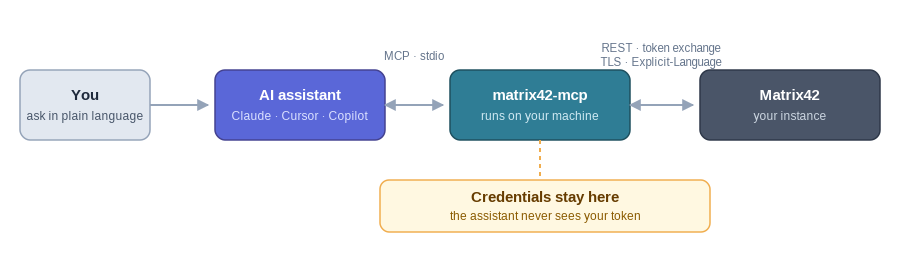
The server holds the credentials and talks to Matrix42 on the assistant's behalf: it performs the
API-token exchange, sets the Explicit-Language header, and handles TLS. The assistant never sees
your credentials.
npx matrix42-mcp --help
Important
This is an independent community project. It is not affiliated with, endorsed by, sponsored by, or supported by Matrix42 AG. "Matrix42" is a trademark of its respective owner and is used here only to describe what this software interoperates with. Support comes from the community via GitHub issues - do not contact Matrix42 support about this project, and do not expect a service-level agreement of any kind. It is provided "as is" under the MIT licence.
Note
Status: early release. The server is read-only by default - write tools are not even listed unless you set
M42_ALLOW_WRITES=1.
Highlights
- Read-only by default. Write tools are absent from the tool list unless explicitly enabled.
- Never guesses. Every column is resolved against your instance's live schema before a query runs, so a field your instance does not have is reported - not sent and turned into an opaque 500.
- Teaches, then acts. Four written guides ship with the server as MCP resources, covering the data model, the schema, the ASQL filter language and the REST conventions.
- Preview before you write. Every write returns the exact request it would send until you
pass
confirm. The preview is the same plan object that gets executed, so it cannot drift. - Safe defaults where it counts. Notification e-mails are off, journal entries are internal, and cascading closes are opt-in.
- No Matrix42 code or content. Every guide is original prose that links to the official docs rather than reproducing them.
Table of contents
Understand it
Set it up
Use it
Work on it
Why
Matrix42's API surface is large (a typical instance exposes ~190 web services and ~1,100 operations), plus a data model of ~800 data definitions and ~240 configuration items, and an assistant has no way to know what exists. Point it at this server and it can search for the right endpoint, read the exact contract, and then write correct integration code - instead of guessing at URLs, auth, and headers.
What it can do
| Discover the API | ~1,100 operations with full request and return contracts, and whether each is update-safe |
| Understand the model | 785 data definitions, 237 configuration items, pickup values, relations and cardinality |
| Read records | ASQL queries with paging, saved views, journal, attachments, and links into the web interface |
| Work the service desk | Search seven ticket kinds by name, service levels, thirteen curated domains, or search all of them at once |
| Act on tickets | Create, close, classify, take over, forward, pause, reopen, set deadlines, track time - each previewed first |
What a conversation looks like
You: Which open hardware tickets are still unresolved, and are any past their service level?
The assistant works it out without you naming a single id:
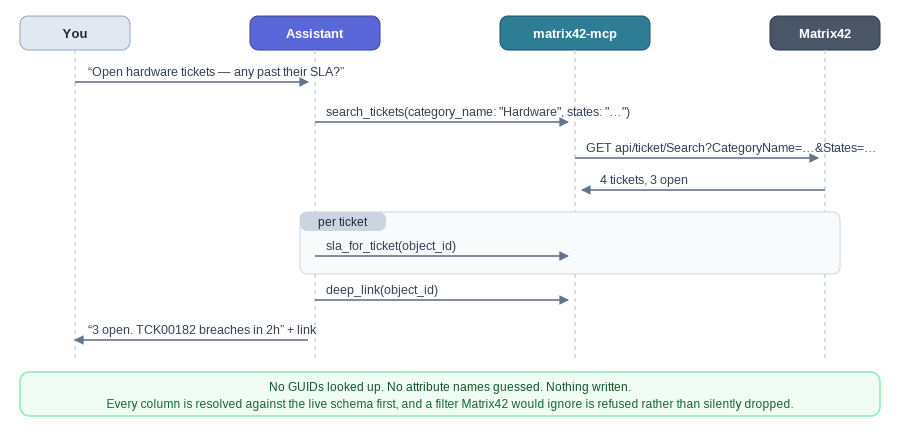
Note what did not happen: no GUID lookups, no guessed attribute names, and nothing was written. Note also what the server refuses: a filter Matrix42 accepts but never applies, so an unfiltered answer is never mistaken for a filtered one.
Requirements
- Node.js 22.19 or newer (required by undici, the HTTP client)
- A Matrix42 instance and either an API token (recommended) or basic-auth credentials
Creating an API token
In the Matrix42 Administration application, create an API token for the account the assistant should act as. The server exchanges it for a short-lived access token automatically and re-exchanges it before it expires.
Basic auth is supported but discouraged: many instances accept the credentials yet still refuse API access with
403because of role/audience restrictions.
Configuration
All configuration is via environment variables.
| Variable | Required | Default | Description |
|---|---|---|---|
M42_HOST |
✅ | - | Base URL of the instance, e.g. https://matrix42.example.com |
M42_API_TOKEN |
✅¹ | - | API token; exchanged for an access token automatically |
M42_USERNAME / M42_PASSWORD |
✅¹ | - | Basic-auth alternative to M42_API_TOKEN |
M42_LANGUAGE |
en-US |
Response language, sent as Explicit-Language |
|
M42_TOOLS |
all | Comma-separated tool ids to expose | |
M42_ALLOW_WRITES |
0 |
Set to 1 to expose tools that modify data. Write tools are not registered at all unless this is set. |
|
M42_ALLOW_INSECURE_TLS |
0 |
Set to 1 to skip TLS verification (self-signed dev instances only) |
|
M42_AUDIT_NOTE |
1 |
Mark created tickets with an internal note saying they were raised through this server. Set to 0 to disable. |
|
M42_AGENT_LABEL |
Matrix42 MCP server |
How the assistant is named in that note | |
M42_UI_URL |
discovered | Origin of the web interface, for deep links. Discovered from the instance's web shell config when unset. | |
M42_TIMEOUT_MS |
30000 |
Per-request timeout |
¹ Provide either M42_API_TOKEN or both M42_USERNAME and M42_PASSWORD.
Client setup
The server runs over stdio: your MCP client starts it. No install step is needed - npx fetches
it on demand.
Claude Code
claude mcp add matrix42 \
  --env M42_HOST=https://matrix42.example.com \
  --env M42_API_TOKEN=your-api-token \
  -- npx -y matrix42-mcp
Claude Desktop
claude_desktop_config.json
(macOS: ~/Library/Application Support/Claude/, Windows: %APPDATA%\Claude\)
{
  "mcpServers": {
    "matrix42": {
      "command": "npx",
      "args": ["-y", "matrix42-mcp"],
      "env": {
        "M42_HOST": "https://matrix42.example.com",
        "M42_API_TOKEN": "your-api-token"
      }
    }
  }
}
Cursor
~/.cursor/mcp.json (global) or .cursor/mcp.json (per project)
{
  "mcpServers": {
    "matrix42": {
      "command": "npx",
      "args": ["-y", "matrix42-mcp"],
      "env": {
        "M42_HOST": "https://matrix42.example.com",
        "M42_API_TOKEN": "your-api-token"
      }
    }
  }
}
VS Code (GitHub Copilot)
.vscode/mcp.json - this shape prompts for the token instead of storing it in the file:
{
  "inputs": [
    { "id": "m42-token", "type": "promptString", "description": "Matrix42 API token", "password": true }
  ],
  "servers": {
    "matrix42": {
      "type": "stdio",
      "command": "npx",
      "args": ["-y", "matrix42-mcp"],
      "env": {
        "M42_HOST": "https://matrix42.example.com",
        "M42_API_TOKEN": "${input:m42-token}"
      }
    }
  }
}
Other stdio-capable clients (Windsurf, Cline, Zed, …) use the same command / args / env shape.
Verifying the connection
Ask the assistant to call server_info, or run the bundled smoke test against your instance:
git clone https://github.com/sus-tech-gmbh/M42-MCP.git
cd M42-MCP && npm install && npm run build

M42_HOST=https://matrix42.example.com \
M42_API_TOKEN=your-api-token \
node scripts/smoke.mjs
It connects as a real MCP client and exercises every tool.
You can also run the CLI directly:
npx matrix42-mcp --help    # usage and configuration
npx matrix42-mcp --tools   # available tool ids
Tools and actions
Six tools, each grouping a set of actions. Everything the server can do lives here - the read tools first, then the one that writes.
| Tool | What it does |
|---|---|
server_info |
Reports which Matrix42 instance is connected and verifies the credentials work. Never returns credentials. |
webservice_discovery |
Discovers the REST API. See the actions below. |
schema_discovery |
Explores the data model: data definitions, configuration items, attributes, relations, pickup values. |
data_query |
Reads records: ASQL queries, saved views, journal entries, attachments, plus an ASQL guide and validator. |
service_desk |
Searches tickets of any kind, answers service-level questions, and browses assets, contracts, catalog services, bookings, knowledge articles, approvals, imports and workflow instances. |
ticket_actions |
Writes - the ticket lifecycle: create, close, take over, forward, pause, reopen, set deadlines, track time, add journal entries. Only present when M42_ALLOW_WRITES=1. |
webservice_discovery actions
| Action | Parameters | Returns |
|---|---|---|
api_overview |
- | General Matrix42 API conventions: token exchange, Explicit-Language, Public vs Product API, common data surfaces. Useful before writing standalone integration code. |
list_operations |
search?, service_id?, limit? |
Operations as {id, name, method, path, service, documentation}. search filters on name, documentation, and service name. Defaults to the first 200 matches; pass limit: 0 for all. |
list_services |
- | Every web service with its route prefix and documentation. |
describe_operation |
operation_id |
One operation's full contract: HTTP method, path, parameters with types, and return type. |
Typical flow: api_overview once → list_operations with a search term → describe_operation
on the one you want.
schema_discovery actions
| Action | Parameters | Returns |
|---|---|---|
schema_overview |
- | How the Matrix42 data model fits together: data definitions vs configuration items, fragments and multi-fragments, cardinality, pickups, and where to find the official docs. |
list_data_definitions |
search?, include_pickups?, limit? |
Definitions as {internalName, displayName, description, classType, isPickup, isCustom}. Pickup classes are excluded unless asked for. |
list_configuration_items |
search?, limit? |
Items with their main class and member definitions. |
describe_data_definition |
name, include? |
Attributes with decoded datatypes and pickup cross-links. Relations are excluded by default (a central definition can have 150+) - pass include: "relations" or "both". |
describe_configuration_item |
name |
The definitions an object is composed of, each with its cardinality and a isMultiFragment flag. |
get_pickup_values |
pickup_class or name+attribute |
The selectable {value, label} pairs - so a model filters on real values instead of guessing codes. |
Typical flow: schema_overview → list_* with a search term → describe_* → get_pickup_values
before filtering on any pickup attribute.
data_query actions
| Action | Parameters | Returns |
|---|---|---|
asql_guide |
- | The ASQL expression language used by where and columns: operators, dot chains, pickups, T(...) pivots, subqueries, [Expression-ObjectID]. |
validate_asql |
class, expression |
Whether an expression is valid, with the exact error (e.g. "does not contain attribute Nope"). Cheaper than a failed query. |
query |
class, columns?, where?, sort?, page_size?, page? |
Rows plus typed column metadata, with paging (hasMore). |
get_fragment |
class, fragment_id |
One complete fragment. |
get_object |
ci_name, object_id |
One whole object (all fragments of a configuration item). |
list_views / run_view |
search? / view_id |
The instance's saved data queries - curated views that already carry a predefined filter. Prefer a matching view over hand-written ASQL. |
list_journal |
object_id |
An object's comment/activity timeline. |
list_attachments |
object_id |
The files attached to an object. |
deep_link |
object_id, view_type? |
A URL into the Matrix42 web interface - preview, edit, create or run an action. Resolves the object's configuration item itself, so you only need the object id. |
Typical flow: asql_guide once → schema_discovery to find the class and its pickup values →
validate_asql → query. Always pass sort when paging; page boundaries are otherwise unstable.
Numeric enums are decoded for you (Datatype: 2 → "Int", Cardinality: 3 → "Optional (Multi)"),
and customisations are flagged using the custom prefix the instance itself reports.
Links into the web interface
data_query(action='deep_link') builds a URL an assistant can hand you, in the format Matrix42
documents for deep linking:
https://your-instance/wm/app-ServiceDesk/?view-options={"type":"SPSActivityTypeTicket",
                                                        "viewType":"preview",
                                                        "objectId":"<object id>"}
view_type selects what opens: preview (default, read-only), edit, new for a creation form,
or action for a wizard. Only new works without an object id, and action additionally needs an
action_id. Nothing is ever changed by opening a link - even edit waits for a person to save.
You only need the object id. A base data definition is reused by many configuration items -
SPSActivityClassBase alone backs incidents, service requests and changes - so the server resolves
the real one for you rather than making you pick. Pass a wrong ci_name and it corrects it; pass a
fragment id and it refuses instead of handing you a link that opens nothing.
Links target the web interface's own origin, not the API host you connected to. Those are often
different: an instance reachable at an IP commonly serves its UUX under a real name, and the shell's
config.json says which. Loading the shell from the wrong origin leaves the app calling an origin
it was not served from, which fails after the page has already appeared to load. The server reads
that origin from the instance and reports it as webInterface alongside the link; M42_UI_URL
overrides it.
service_desk actions
| Action | Parameters | Returns |
|---|---|---|
data_model |
- | How Matrix42's modules map onto a handful of base classes - where tickets, assets, licenses, contracts, SLAs and catalog items actually live. Read it when you are unsure where something is. |
search_tickets |
kind, plus subject, category_name and/or states |
Matching tickets. kind is one of ticket, incident, problem, change, task, service_request, kb_article. Other filter parameters exist but Matrix42 ignores them, so passing one is refused. |
get_ticket |
ticket_object_id |
One ticket's summary as the service desk sees it. |
sla_for_ticket |
ticket_object_id |
The service level agreements that apply, as Matrix42 itself computes them. |
sla_times |
ticket_object_id |
Reaction and solution time state. |
browse |
domain, search?, where?, limit? |
Rows of one curated domain, plus the fields this instance does not have. |
find |
search, domains?, limit? |
Searches every domain at once for a name - for when you do not know where something lives. Domains that fail (module not installed) are reported, not fatal. |
Every kind shares the same contract, so one call shape covers the whole service desk. Only
subject, category_name and states actually filter it - Matrix42 accepts
initiator_name, ticket_number, asset_id and the rest, then ignores them and returns every
ticket. Passing one is refused rather than handing back an unfiltered result you would read as
filtered; the refusal points at data_query with an ASQL where, which does filter on those.
browse domains: assets, stock_units, contracts, slas, catalog_services, bookings,
kb_articles, approvals, imports, import_runs, workflow_instances, workflow_definitions,
applications. Workflows are read-only - this server lists definitions and instances but never
starts, suspends, resumes or cancels them.
Columns are never guessed. Before every browse, the server reads the definition's real
attribute list from the instance and keeps only the fields that exist, reporting the rest as
unavailableFields. A module you have not licensed therefore yields a shorter row, not a failed
call. The same rule is stated in the guides and the server instructions, so a connected model
follows it too.
All read tools are annotated readOnlyHint: true, so clients can distinguish them from anything that
would change data.
ticket_actions actions (writing data)
Write tools are absent from the tool list unless M42_ALLOW_WRITES=1, so a default deployment
cannot modify anything even if a model asks it to. When enabled, ticket_actions offers:
| Action | Notes |
|---|---|
create_ticket |
Returns the new object id, which every other action takes directly. |
close_ticket |
Closes by object id, with an optional solution and closing reason. |
add_journal_entry |
Adds a comment to any object, with optional template parameters. |
classify_ticket |
Only suggests a type from text - changes nothing. |
take_over / accept |
Claims tickets. Needs type_name, the configuration item they belong to. |
forward |
Hands tickets to a role_id or user_id, optionally applying an OLA. |
pause |
Holds a ticket, optionally stopping the escalation clock (not_escalate_while_paused). |
reopen |
Reverses a close, with a reason. |
return_to_role |
Gives one tick |