MESH-API v0.7.5.4 Beta — Meshtastic + MeshCore Mesh Router & API / AI Bridge
🎉 Now with full MeshCore support (since v0.7.0)
You can run MESH-API with EITHER a Meshtastic node, a MeshCore node — or BOTH at the same time, with MESH-API handling cross-network routing between them. MeshCore is a first-class, core-owned radio on equal footing with Meshtastic. Slash commands, the AI assistant, and every extension work across both networks, and the WebUI adapts to whichever radios you have connected.
⚠️ These features are widely untested and I am actively seeking community feedback. If you run a Meshtastic-only, MeshCore-only, or dual-radio setup, please tell me what works, what breaks, and what you'd like to see — open a GitHub Issue. Your real-world reports directly shape the MeshCore implementation going forward.
Also included: a built-in MCP (Model Context Protocol) server that turns MESH-API into an agentic backend for AI tools, and a firmware/software update system. See the dedicated sections below.
🆕 What's new
v0.7.5.0 matures the MeshCore Bluetooth / Wi-Fi / USB connection paths: a configured
ble_pinnow actually pairs (MESH-API auto-registers a BlueZ pairing agent that supplies it),ble_pinis now in the ⚙️ Config editor and Setup Wizard, and the connection banner now shows why MeshCore isn't connected (BLE signal strength, node-seen-in-scan, and a plain-language hint). It also rolls up a batch of fixes — the #60 WebUI-save startup crash, a path-traversal hole, node-name XSS, restored/emergencyon LongFast, plus Home Assistantagent_id(#61) and opt-in commands from Telegram (#59). Building on: v0.7.4.1 revamps the dashboard Send a Message composer — Broadcast/Direct mode tabs, per-network broadcast checkboxes (📡 Meshtastic, 🟣 MeshCore, 🌉 Bridged), and a bridged channel dropdown that now shows both routed channels (e.g.0 → 📡 LongFast + 🟣 Public) — adds a Previously Seen node section with an adjustable staleness threshold, and fixes MeshCore presence so addressable contacts no longer drop out of the live node list (activity-based last-heard). v0.7.4 updated the first-start Setup Wizard to walk you through MeshCore as well as Meshtastic: a dedicated MeshCore step (serial / TCP / BLE, adverts, channel bridging), a toggle to run a MeshCore-only / standalone node, and a default send-network selector. The prior v0.7.3.7 ensured all extensions route to MeshCore (GitHub #59), and v0.7.3.6 added a token-free heartbeat for named AI endpoints.📜 See the full version history in CHANGELOG.md.
❤️ Support MESH-API Development — Keep the Lights On
MESH-API is built and maintained by one developer with the help of AI tools. There is no corporate sponsor, no VC funding — just late nights, community feedback, and a passion for off-grid communication.
If MESH-API has been useful to you — whether you're running it on a Raspberry Pi in your go-bag, bridging your local mesh to Discord, or experimenting with AI on LoRa — please consider making a donation. Every contribution, no matter the size, directly fuels continued development, bug fixes, new extensions, and keeping this project free and open-source for everyone.
Donate via PayPal (Preferred)

Click here to donate via PayPal
Crypto Donations
| Currency | Address |
|---|---|
| BTC | bc1qalnp0xze5t9nner2754k2pj7yjhkrt3uzvzdvt |
| ETH | 0xAd640c506f5d2368cAF420a117380820C0C5F61C |
| XRP | rpciwKrQSaRZ1UjPunH8vLJhoM2s4NaYoL |
| DOGE | DM79aRx58J6RYuWakHjiELWbNJkTTDj1cv |
Thank you to everyone who has donated, filed issues, tested pre-releases, and spread the word. You are what makes this project possible. 🙏
MESH-API is an experimental project that bridges Meshtastic (& now MeshCore ) LoRa mesh networks with powerful AI chatbots and 3rd party APIs.
What Sets MESH-API Apart?
Most projects in this space stop at being "AI chatbot integrations" — but MESH-API is much more than that.
-
Full Router / Mesh Operator
MESH-API isn’t just talking to an LLM. It’s a protocol bridge and mesh backbone, designed to let LoRa networks, online (or offline) services, and APIs talk to each other in real time. -
Not a One-Trick Pony
Where other tools simply connect to AI, MESH-API is built to route, translate, and post messages between different systems and services — making it a true hub for both on-grid and off-grid communication. -
Expandable by Design
Any software with a working API can be integrated. That means you can merge in external services, dashboards, or automation platforms, extending the mesh far beyond its original scope. -
AI-Powered Off-Grid Networks
MESH-API provides the foundation for self-sufficient LoRa mesh networks enhanced with AI, ensuring communication, automation, and decision-making remain possible — even without the internet.
In short, MESH-API bridges the gap between mesh services and online/locally hosted services, making it a powerful backbone for resilient, intelligent LoRa networks.
Disclaimer:
This project is NOT ASSOCIATED with the official Meshtastic Project. It is provided solely as an extension to add AI and advanced features to your Mesh network.
v0.7.4.1 Beta:
The 0.7.x line makes MeshCore a first-class radio and adds the MCP server and firmware-update system; v0.7.4.1 revamps the Send a Message composer (broadcast/direct mode tabs, multi-network broadcast targeting, bridged dropdown showing both channels), adds a Previously Seen node section, and fixes MeshCore node presence, building on v0.7.4's MeshCore Setup Wizard and v0.7.3.7's fix so every extension routes outbound messages to MeshCore as well as Meshtastic. These features are still relatively untested in the field — I am actively seeking community feedback. Run it with a Meshtastic node, a MeshCore node, or both, and please report what works and what breaks. Avoid relying on it for mission‑critical tasks or emergencies; always keep backup communication methods available and use responsibly.
I am one robot using other robots to write this code. Some features are still untested in the field. Check the GitHub issues for fixes or feedback!

Features
- Multi-Radio: Meshtastic, MeshCore, or Both (New in v0.7.0)
- MeshCore is a first-class, core-owned radio (not an extension) on equal footing with Meshtastic, connecting over serial / TCP / BLE.
- Run a Meshtastic radio only, a MeshCore radio only (fully standalone — no Meshtastic device required), or one of each with MESH-API as a cross-network man-in-the-middle.
- Slash commands, the AI assistant, and every extension work across both networks. Send to one network or both at once.
- WebUI adapts — per-network connection banner, node network filter with collapsible Meshtastic/MeshCore sections, network badges on nodes & messages, distinct map markers, MeshCore group/private channels in the send form, and DMs to MeshCore contacts.
- MCP (Model Context Protocol) Server (New in v0.7.0)
- Exposes MESH-API core functions and extensions as MCP tools at
POST /mcp, so external AI agents (Claude, Perplexity, Hermes, custom) can drive the mesh as an agentic backend. Disabled by default; bearer-token auth. See MCP Server.
- Exposes MESH-API core functions and extensions as MCP tools at
- Firmware & Software Updates (New in v0.7.0)
- Detects your connected Meshtastic/MeshCore device and notifies you (🔄 Updates badge) when newer Meshtastic firmware, MeshCore firmware, or MESH-API is available, with stable / beta / alpha release-channel selection. Optional ESP32 over-USB flashing (off by default).
- Plugin-Based Extensions System (New in v0.6.0)
- 30 built-in extensions across 7 categories: Communication, Notifications, Emergency/Weather, Ham Radio/Off-Grid, Smart Home, Mesh Bridging, and AI Agents.
- Drop-in plugin architecture — add or remove extensions by copying a folder. No core code changes required.
- Extensions can register slash commands, react to emergencies, observe messages, expose HTTP endpoints, and run background services.
- WebUI Extensions Manager — view, enable/disable, and configure extensions from the dashboard.
- See the Extensions Reference section below for full details on all built-in extensions, or Developing Custom Extensions to build your own.
- Multiple AI Providers
- Support for Local models (LM Studio, Ollama), OpenAI, Claude, Gemini, Grok, OpenRouter, Groq, DeepSeek, Mistral, Hermes (Nous Research), generic OpenAI-compatible endpoints, and Home Assistant integration.
- Home Assistant Integration
- Seamlessly forward messages from a designated channel to Home Assistant’s conversation API. Optionally secure the integration using a PIN.
- NASA Space Weather Monitoring
- Track geomagnetic storms, solar flares, coronal mass ejections, and more via NASA's DONKI API. Auto-broadcast significant events to the mesh with configurable Kp index and flare class thresholds. Slash commands:
/spaceweather,/solarflare,/geomagstorm.
- Track geomagnetic storms, solar flares, coronal mass ejections, and more via NASA's DONKI API. Auto-broadcast significant events to the mesh with configurable Kp index and flare class thresholds. Slash commands:
- n8n Workflow Automation
- Bidirectional bridge with n8n — forward mesh messages and emergencies to n8n webhook triggers, receive workflow outputs on the mesh, list active workflows, and trigger them via slash commands. Enables powerful no-code automation pipelines for your mesh network.
- Advanced Slash Commands
- Built‑in commands: suffixed
/about-XY,/help-XY,/motd-XY,/whereami-XY,/nodes-XY, AI commands with your unique suffix (e.g.,/ai-XY,/bot-XY,/query-XY,/data-XY), unsuffixed/test, and unsuffixed/emergency(or/911), plus custom commands viacommands_config.json. - Commands are now case‑insensitive for improved mobile usability.
- New: a per-install randomized alias (e.g.
/ai-9z) is generated on first run to reduce collisions when multiple bots exist on the same mesh or MQTT network. You can change it inconfig.json(fieldai_command). All AI commands require this suffix, and other built‑ins (except emergency/911) also require your suffix. - Strongly encouraged: customize your commands in
commands_config.jsonto avoid collisions with other users.
- Built‑in commands: suffixed
- Emergency Alerts
- Trigger alerts that are sent via Twilio SMS, SMTP Email, and, if enabled, Discord.
- Emergency notifications include GPS coordinates, UTC timestamps, and user messages.
- Enhanced REST API & WebUI Dashboard
- A modern three‑column layout showing direct messages, channel messages, and available nodes. Stacks on mobile; 3‑wide on desktop. Controls (⌘ Commands, 🧩 Extensions, ⚙️ Config, 📜 Logs) live in the “Send a Message” header (top‑right).
- Interactive Node Map — Leaflet.js‑powered map view with markers for all GPS‑enabled nodes. 25 tile providers including OpenStreetMap, Carto (Light, Dark, Voyager, No‑Label variants), OpenTopoMap, Esri (Street, Satellite, Topo, NatGeo, Light/Dark Gray Canvas, Ocean), Stadia (Stamen Terrain/Toner/Toner Lite/Watercolor, Alidade Smooth/Dark, Outdoors, OSM Bright), Humanitarian OSM, CyclOSM, and OPNVKarte. Defaults to Carto Positron (Light). Offline map image support — upload a local map image with lat/lon bounds via settings; Leaflet overlays it as a fully functional map layer with markers, pan, and zoom. Offline detection with fallback notice. Popups include node name, custom name, favorite star, ID, last heard, hop count, DM/PING/PONG buttons, and Google Maps link — all on a single row. Mini DM box over the map includes Send, PING, and PONG on the same row.
- Collapsible Channel Groups — Each channel is a toggle‑able group with an unread‑count badge. Click the 📻 header to expand/collapse.
- Draggable Dashboard — All major sections (Send Form, Node Map, Message Panels, Discord) can be reordered via ☰ drag handles. The three message columns (DMs, Channels, Nodes) are also independently sortable. Layout order is saved to localStorage. Sections can be hidden/shown from the UI Settings panel.
- Notification Sounds — Five built‑in Web Audio API sounds (Two‑Tone Beep, Triple Chirp, Alert Chime, Sonar Ping, Radio Blip) plus a custom sounds library supporting multiple uploaded audio files (stored as base64 in localStorage). Separate sound selection for Default, DMs, Channels, and individual nodes — each with its own dropdown populated from built‑in plus all custom sounds. Test button, volume slider, and per‑node sound management in settings.
- Node Enhancements — Every node shows DM, PING, and PONG buttons, last‑heard time (📡), beacon time, hop count, distance, Show on Map (fly‑to), and Google Maps link on a single line. Favorite nodes — toggle a ⭐ star to pin nodes to the top of the Available Nodes list (persisted in localStorage). Custom node names — click ✏️ to assign a logical name displayed in cyan alongside the original shortName. Favorites and custom names also appear in map popup titles and tooltip labels.
- Emoji enhancements: each message has a React button that reveals a compact, hidden emoji picker; choosing an emoji auto‑sends a reaction (DM or channel). The send form includes a Quick Emoji bar that inserts emojis into your draft (does not auto‑send).
- Additional endpoints include
/messages,/nodes,/connection_status,/logs,/logs_stream,/send,/ui_send,/commands_info(JSON commands list), and a new/discord_webhookfor inbound Discord messages. - UI customization through settings panel including button theme color, section colors, 25 map tile styles (default: Carto Light), offline map image upload with lat/lon bounds, hue rotation, notification sounds (built‑in or custom library with multiple files), per‑node sound assignments, section visibility toggles, and volume control. An About section with links to Meshtastic, MeshCore, and the project's GitHub and website.
- Config Editor (WebUI): Click the “Config” button in the header to view/edit
config.json,commands_config.json, andmotd.jsonin a tabbed editor. JSON is validated before saving; writes are atomic. Some changes may require a restart to take effect. - Extensions Manager (WebUI): Click the “Extensions” button to view extension status, enable/disable extensions, edit extension configs, and hot‑reload all extensions — all from the browser.
- Improved Message Chunking & Routing
- Automatically splits long AI responses into configurable chunks with delays to reduce radio congestion.
- Configurable flags control whether the bot replies to broadcast channels and/or direct messages.
- New: LongFast (channel 0) response toggle — by default the bot will NOT respond on LongFast to avoid congestion. Enable
ai_respond_on_longfastonly if your local mesh agrees. - Etiquette: Using AI bots on public LongFast is discouraged; keep it off unless you’re on an isolated/private mesh with community consent.
- Robust Error Handling & Logging
- Uses UTC‑based timestamps with an auto‑truncating script log file (keeping the last 100 lines if the file grows beyond 100 MB).
- Enhanced error detection (including specific OSError codes) and graceful reconnection using threaded exception hooks.
- Discord Integration Enhancements
- Route messages to and from Discord.
- New configuration options and a dedicated
/discord_webhookendpoint allow for inbound Discord message processing. - MQTT-aware response gating: set
respond_to_mqtt_messagesto true inconfig.jsonif you want the bot to respond to messages that arrive via MQTT. Off by default to prevent multiple server responses. - User‑initiated only: The AI does not auto‑message or greet new nodes; it responds only to explicit user input.
- Commands modal & startup helper
- WebUI includes a Commands modal (button in the “Send a Message” header) that lists available commands with descriptions.
- The current alias suffix and a one‑line commands list are printed at startup for easy reference.
- Windows & Linux Focused
- Official support for Windows environments with installation guides; instructions for Linux available now - MacOS coming soon!
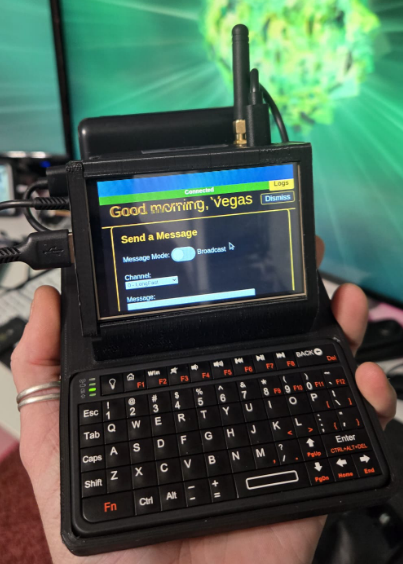
An example of an awesome Raspberry Pi 5 powered mini terminal - running MESH-API & Ollama with HomeAssistant integration!
- Top case model here by oinkers1: https://www.thingiverse.com/thing:6571150
- Bottom Keyboard tray model here by mr_tbot: https://www.thingiverse.com/thing:7084222
- Keyboard on Amazon here: https://a.co/d/2dAC9ph
Quick Start (Windows)
-
Prerequisites
- Python 3.11+ — Download from python.org. During install, check “Add Python to PATH”.
- Git (optional) — git-scm.com for cloning, or download the ZIP from GitHub.
-
Download/Clone
- Clone the repository (or download and extract the ZIP):
git clone https://github.com/mr-tbot/mesh-api.git
cd mesh-api
- Clone the repository (or download and extract the ZIP):
-
Create & Activate a Virtual Environment:
python -m venv venv .\venv\Scripts\activate -
Install Dependencies:
pip install --upgrade pip pip install -r requirements.txt -
Configure Files:
- Edit
config.json,commands_config.json, andmotd.jsonas needed. Refer to the Configuration section below. - Or use the Setup Wizard on first launch in the WebUI.
- Edit
-
Start the Bot:
- Double-click
Run MESH-API - Windows.bator run:python mesh-api.py
- Double-click
-
Access the WebUI Dashboard:
- Open your browser and navigate to http://localhost:5000/dashboard.
Quick Start (Ubuntu / Linux)
-
Prerequisites
- Python 3.11+ and pip:
sudo apt update && sudo apt install -y python3 python3-pip python3-venv git - Grant serial port access (required for USB-connected Meshtastic devices):
Log out and back in for the group change to take effect.sudo usermod -aG dialout $USER
- Python 3.11+ and pip:
-
Download/Clone
git clone https://github.com/mr-tbot/mesh-api.git cd mesh-api -
Create & Activate a Virtual Environment:
python3 -m venv venv source venv/bin/activate -
Install Dependencies:
pip install --upgrade pip pip install -r requirements.txt -
Configure Files:
- Edit `config.json