


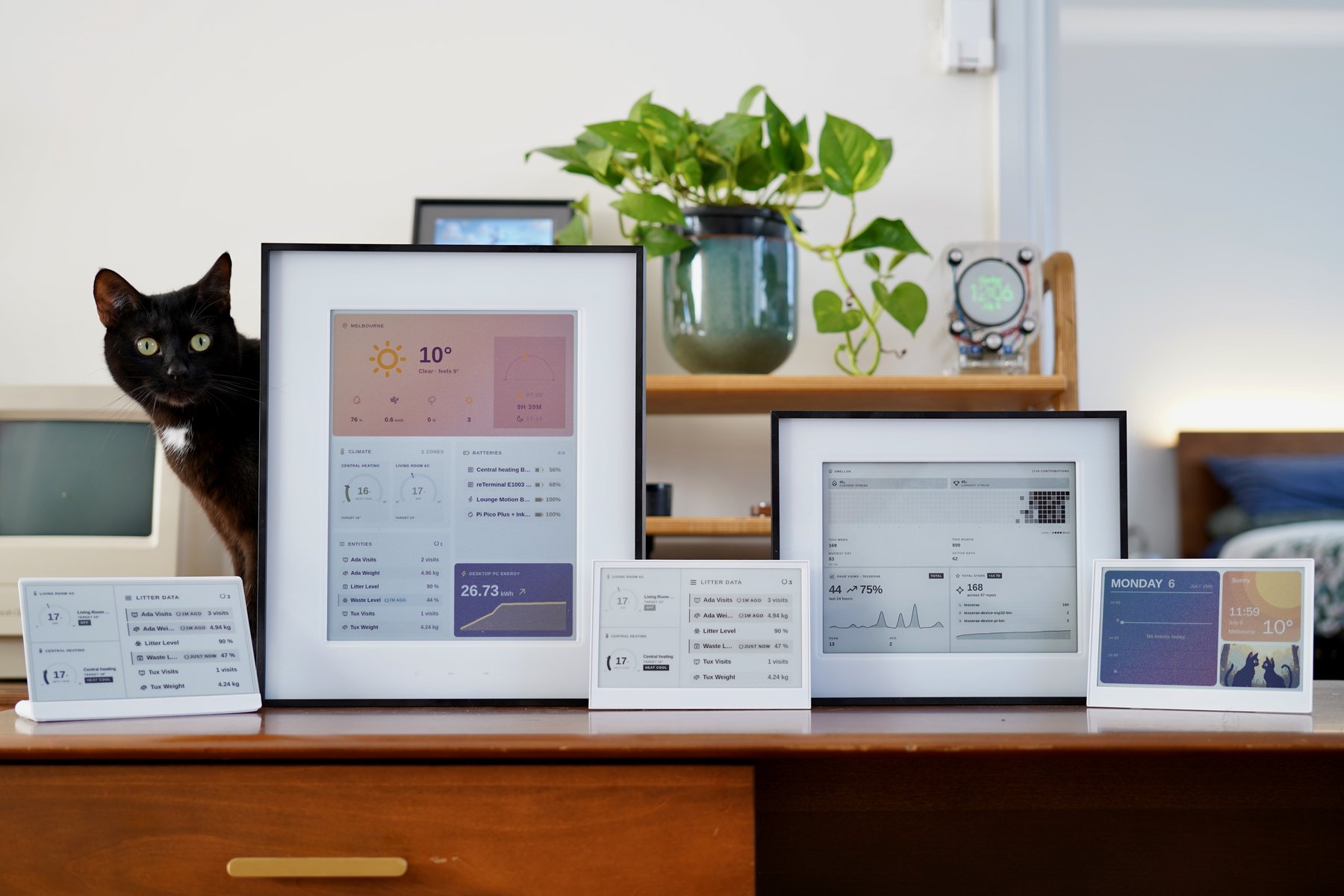
Nine panels, one Tesserae server.
Self-hosted dashboard companion for e-ink displays. Compose tile-based dashboards in a browser, render the frame headless, push it to one or more panels over MQTT or HTTP.
Open source under AGPL-3.0-or-later. The self-hosted server needs no
account and never has to talk to us: the only outbound contact is
api.tesserae.ink for update checks, an anonymous install count, and a
daily aggregate heartbeat, off by default and opt-in (you're asked once at
first-run setup; toggle in Settings → System → Online features).
Tesserae Cloud is a separate hosted Tesserae for people who would rather not run a server: sign in, create a dashboard, and connect your display. This self-hosted server stays the full product and stays free, and a supported panel is not tied to the cloud: it can be pointed at a server of your own at any time, though dashboards made in the cloud are specific to it and would need recreating here.
📖 Full documentation: install guides, hardware quickstarts, widget gallery, community catalog, architecture deep dive, how to build a widget, how to add hardware support.
Quick start
mkdir tesserae && cd tesserae
curl -fsSLO https://raw.githubusercontent.com/dmellok/tesserae/main/docker-compose.yml
docker compose up -d
Open http://localhost:8765. First request walks through password setup and the onboarding wizard.
Other install paths: Home Assistant App, LXC / Proxmox / MicroCloud, macOS / Linux / Pi shell installer, Windows PowerShell, manual venv.
Server is running? Pick a hardware quickstart to get a panel on the wall.
How it works
Dashboards are plain HTML. The editor preview and the production render load the same URL: a headless Chromium (Playwright) screenshots the composition at panel resolution, so "looked fine in the editor, broke on the panel" is impossible by construction.
The frame then goes through a per-device renderer: Floyd-Steinberg dithering against the panel's measured color palette (Spectra 6 and ACeP panels don't actually produce sRGB primaries; calibrated measurements come from epdoptimize), then packing into the exact byte format the panel wants: packed 4-bit Spectra 6, 1-bit mono, or 4-bit grayscale.
Devices are deliberately thin clients with no on-device image
decoding. Always-on clients (a Pi driving an Inky) get frames pushed
over MQTT the moment a page changes. Battery clients (ESP32) wake, GET
their frame over REST with If-None-Match (a 304 skips both the
download and the slow e-ink refresh), POST battery + RSSI telemetry,
and deep-sleep on a server-driven interval. Wall-clock time comes from
the HTTP Date header, so there's no SNTP on-device.
browser editor          Tesserae server                    panels
┌──────────┐   HTTP   ┌──────────────────────┐   MQTT   ┌─────────────┐
│ composer │─────────▶│ headless render      │─────────▶│ Pi + Inky   │
│ /compose │          │ dither (measured     │          ├─────────────┤
└──────────┘          │   palettes)          │   REST   │ ESP32,      │
                      │ pack panel-native    │◀────────▶│ Kindle,     │
                      │ schedule / rotate    │          │ TRMNL       │
                      └──────────────────────┘          └─────────────┘
Every layer is a drop-a-folder plugin: widgets, themes, renderers,
transports, and device kinds. The seams are real directories:
plugins/ · renderers/ ·
transports/ · devices/.
Build dashboards with AI (MCP). Tesserae exposes an
MCP API so an agent can lay out a freeform
dashboard, render a preview to check its work, and push it to a panel. It's on
by default; run the
tesserae-mcp bridge on your agent's
machine (a remote agent needs the token from Settings → System → MCP). See the docs.
Design decisions
Server-side rendering, dumb firmware. The server pre-renders each frame into the exact bytes the panel controller wants; the device firmware streams them straight to the panel. Adding a new panel is a board header plus one driver. The network, power, and provisioning stack never changes.
Widget network egress is allowlisted. Third-party widgets declare the
network hosts they need in a requires: block in plugin.json, and the
host enforces the allowlist at the socket layer. An undeclared connection
raises CapabilityDenied instead of phoning home. That is the extent of
the containment: widgets otherwise run in-process, and the trust model is
PR review of the community catalog, not a sandbox. The
threat model is
documented honestly, including what it doesn't catch.
One server, a fleet of panels. Tesserae splits rendering from transport from hardware, so a single instance drives every panel in the house, each with its own dashboards, schedules, and rotations.
Community widgets install from an audited catalog. Pinned release tarballs, sha256-verified, schema-validated, PR-reviewed: tesserae-widgets.
Supported hardware
Tesserae renders to one of several panel families through drop-a-folder device plugins. In the tables below, ✅ means the panel has been confirmed on real hardware (on my bench or via a community report); TBD means a client and hardware profile ship but nobody has confirmed a frame on the physical panel yet. The per-renderer bench matrix lives at Screens & compatibility.
Some links below are affiliate links. Seeed product links carry a Tesserae affiliate tag: buying through one gets you a discount at checkout and pays a small commission that goes back into the project. Nothing is listed here because of it, and a panel's ✅ / TBD status means exactly what it says above. Links without the tag are plain product links.
Seeed Studio
The reTerminal E-Series and XIAO ePaper family run the Tesserae-native firmware; flash from the browser in one click at tesserae.ink/flash (Chrome / Edge, Web Serial, no toolchain). Battery-powered, no assembly required.
| Model | Panel | Client | Status |
|---|---|---|---|
| reTerminal E1001 | 7.5" mono, 800×480 | tesserae-device-firmware | ✅ |
| reTerminal E1002 | 7.3" Spectra 6, 800×480 | tesserae-device-firmware | ✅ |
| reTerminal E1003 | 10.3" mono, 16-level grey, 1872×1404 | tesserae-device-firmware | ✅ |
| reTerminal E1004 | 13.3" Spectra 6, 1200×1600 | tesserae-device-firmware | ✅ |
| reTerminal Sticky | 3.97" mono, 4-level grey, 480×800 portrait | tesserae-device-firmware | ✅ |
| XIAO ePaper EE02 | 13.3" Spectra 6, 1200×1600 | tesserae-device-firmware | ✅ |
| XIAO ePaper EE03 | 10.3" mono, 16-level grey, 1872×1404 | tesserae-device-firmware | TBD |
| XIAO 7.5" ePaper Panel | 7.5" mono, 800×480 | tesserae-device-firmware | TBD |
| TRMNL 7.5" OG DIY Kit | 7.5" mono, 800×480 | TRMNL firmware | ✅ via BYOS |
M5Stack
The PaperS3's screen has no controller chip: the ESP32-S3 drives the glass directly and the 16 grey levels come from a waveform table in the firmware rather than from the panel. Greyscale tuning is therefore a firmware change. Partial refresh is not implemented yet, so this panel has no tap echo or on-device touch controls, and its touch digitiser is not wired up.
The link goes to M5's documentation rather than their store: M5 have marked the PaperS3 end of life and it is sold out, so this entry is for people who already own one.
The original M5Paper (pre-S3, classic ESP32-D0WDQ6-V3) drives the same 4.7" glass through an IT8951 controller over SPI, so it reuses the reTerminal E1003's greyscale driver. Also discontinued; this entry is for existing owners.
The PaperMono (2026, Pro and Lite) is a 3.97" 480x800 4-level greyscale handheld on the reTerminal Sticky's controller family, so it reuses that driver and wire format; its panel rails sit behind an I2C IO expander and its battery is read from the on-board PMIC. Confirmed on hardware; touch, microSD and the frontlight are not wired yet.
| Model | Panel | Client | Status |
|---|---|---|---|
| M5Paper | 4.7" mono, 16-level grey, 960×540 (IT8951) | tesserae-device-firmware | ✅ |
| PaperS3 | 4.7" mono, 16-level grey, 960×540 | tesserae-device-firmware | TBD |
| PaperMono / PaperMono Lite | 3.97" mono, 4-level grey, 480×800 portrait (SSD1677) | tesserae-device-firmware | ✅ |
Pimoroni Inky
| Panel | Resolution | Client | Status |
|---|---|---|---|
| Inky Impression 4" (6-colour Spectra 6) | 600×400 | pi-png or pi-bin | ✅ |
| Inky Impression 4" (legacy 7-colour ACeP) | 640×400 | pi-png or pi-bin | ✅ |
| Inky Impression 5.7" (7-colour ACeP) | 600×448 | pi-png or pi-bin | ✅ |
| Inky Impression 7.3" (6-colour Spectra 6) | 800×480 | pi-png or pi-bin | ✅ |
| Inky Impression 13.3" (6-colour Spectra 6) | 1600×1200 | pi-png or pi-bin | ✅ |
| Inky pHAT / wHAT | various | pi-png | works via pi_png |
Waveshare
| Panel | Resolution | Client | Status |
|---|---|---|---|
| Waveshare 13.3" Spectra 6 (ESP32-S3) | 1200×1600 | esp32-bin | ✅ |
| Waveshare 7.3" PhotoPainter (ESP32-S3) | 800×480 | photopainter-7.3-bin | ✅ |
| Waveshare 4.2" B/W (ESP32) | 400×300 | esp32-bw | TBD |
Xteink (e-readers)
Xteink's X-series e-readers run CrossInk firmware with Tesserae client support: the dashboard becomes the reader's sleep screen, painted on the sleep transition rather than on a timer.
| Model | Panel | Client | Status |
|---|---|---|---|
| Xteink X3 (4-level grayscale) | 792×528, gray | CrossInk | ✅ |
| Xteink X3 (mono) | 792×528, mono | CrossInk | TBD |
| Xteink X4 | 800×480, mono | CrossInk | ✅ |
| Xteink X4 (4-level grayscale) | 800×480, gray | CrossInk | ✅ |
| Xteink X4 Pro | 800×480, mono | CrossInk | TBD |
Community
Community-authored clients, contributed and maintained by their authors (not in the Tesserae org). Thanks to everyone building these.
| Panel | Resolution | Client | Status |
|---|---|---|---|
| PicPak 4.2" BWRY | 400×300 (4-colour BWRY) | picpak-tesserae-client by @varanu5 | ✅ |
| ZecTrix NOTE4C Devkit | 400×300 (4-colour BWRY) | note4c-tesserae-client by @varanu5 | ✅ |
| Soldered Inkplate 10 | 1200×825 (9.7" 16-level grey) | tesserae.inkplate by @partridgeworks | ✅ |
| Soldered Inkplate 6COLOR | 600×448 (5.85" 7-colour ACeP) | inkplate-tesserae-driver by @ripking | ✅ |
| Soldered Inkplate 13SPECTRA | 1600×1200 (13.3" Spectra 6) | inkplate-tesserae-driver by @ripking | ✅ |
| Pimoroni Inky Frame 7.3" (7-colour ACeP) | 800×480 | tesserae.inkyframe by @partridgeworks | ✅ |
| Pimoroni Inky Frame 7.3" (6-colour Spectra 6) | 800×480 | tesserae.inkyframe by @partridgeworks | TBD |
| reMarkable 2 | 1404×1872 (10.3" 16-level grey) | tesserae.remarkable by @partridgeworks | ✅ |
| reMarkable 1 | 1404×1872 (10.3" 16-level grey) | tesserae.remarkable by @partridgeworks | TBD |
| reMarkable Paper Pro | 1620×2160 (11.8" colour) | tesserae.remarkable by @partridgeworks | TBD |
Kindle and Kobo (KOReader)
E-readers running KOReader with the Tesserae plugin. The plugin pairs with a claim code, decodes 16-level greyscale frames on the reader, and sleeps between refreshes where KOReader exposes the hardware alarm. Kindles need a jailbreak to run KOReader; Kobo does not.
| Panel | Resolution | Client | Status |
|---|---|---|---|
| Kindle Paperwhite 2 (jailbroken) | 758×1024 | tesserae-koreader | TBD |
| Kindle Paperwhite 3/4, Voyage, Basic 4 | 1072×1448 | tesserae-koreader | TBD |
| Kindle Paperwhite 5, Oasis 3, Scribe | 1236×1648, 1264×1680, 1860×2480 | tesserae-koreader | TBD |
| Kobo Clara HD, Libra 2, Sage, Aura | various | tesserae-koreader | TBD |
TRMNL-compatible (HTTP pull)
Any client implementing the TRMNL BYOS spec
works against the trmnl_png renderer.
| Panel | Resolution | Client | Status |
|---|---|---|---|
| TRMNL OG | 800×480 | TRMNL firmware | TBD via BYOS |
| TRMNL X | 1872×1404 (10.3") | TRMNL firmware | TBD |
| Amazon Kindle Paperwhite 2 (jailbroken) | 758×1024 | KOReader trmnl-display plugin (1-bit; see the KOReader section above for the Tesserae plugin) | ✅ |
Custom panels
Anything else: pick custom in Settings → Panel and set the
dimensions. If a client drives your panel, Tesserae can push frames
to it. A generic CircuitPython client (400+ boards) is in development;
follow discussion #24.
Per-client setup walkthroughs (the firmware repos in the Client column): [Install a client](https://docs.tesserae.in